

Color contrast checker, and an MCP server your assistant can call.
HueProof is a WCAG color contrast checker for AI assistants. It measures the WCAG 2.2 contrast ratio for any text and background, with pass or fail at AA and AAA, and the APCA value from the WCAG 3 draft. When a pair fails, it finds the closest color that passes while keeping the hue. It also converts between hex, rgb, hsl and OKLCH, builds evenly spaced palettes, and simulates color blindness.
01Free color contrast checker
Color contrast checker, to WCAG 2.2.
Check any two colors against WCAG AA and AAA for normal text, large text and interface parts, and get the nearest text color that passes. Ratios are never rounded up.
- Normal text AA, 4.5:1Fail
- Normal text AAA, 7:1Fail
- Large text AA, 3:1Pass
- Large text AAA, 4.5:1Fail
- Icons and UI parts AA, 3:1Pass
Nearest text color that passes AA for normal text:
02See it work
HueProof, in real use.
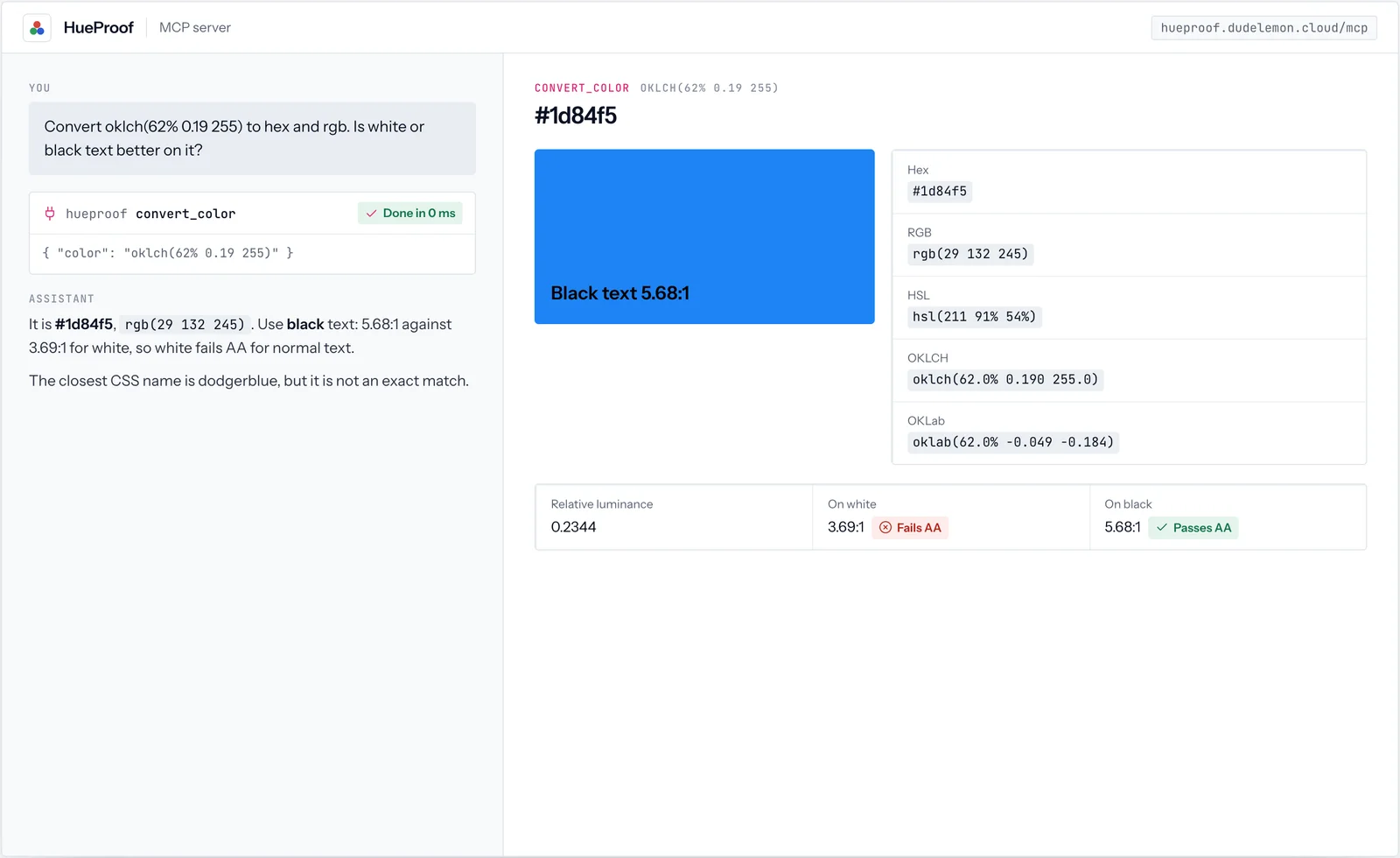
5 screens from real calls to HueProof. Every value shown is what the tool returned; click a screen to open it full size.
03How it works
Where your colors sit on the contrast scale.
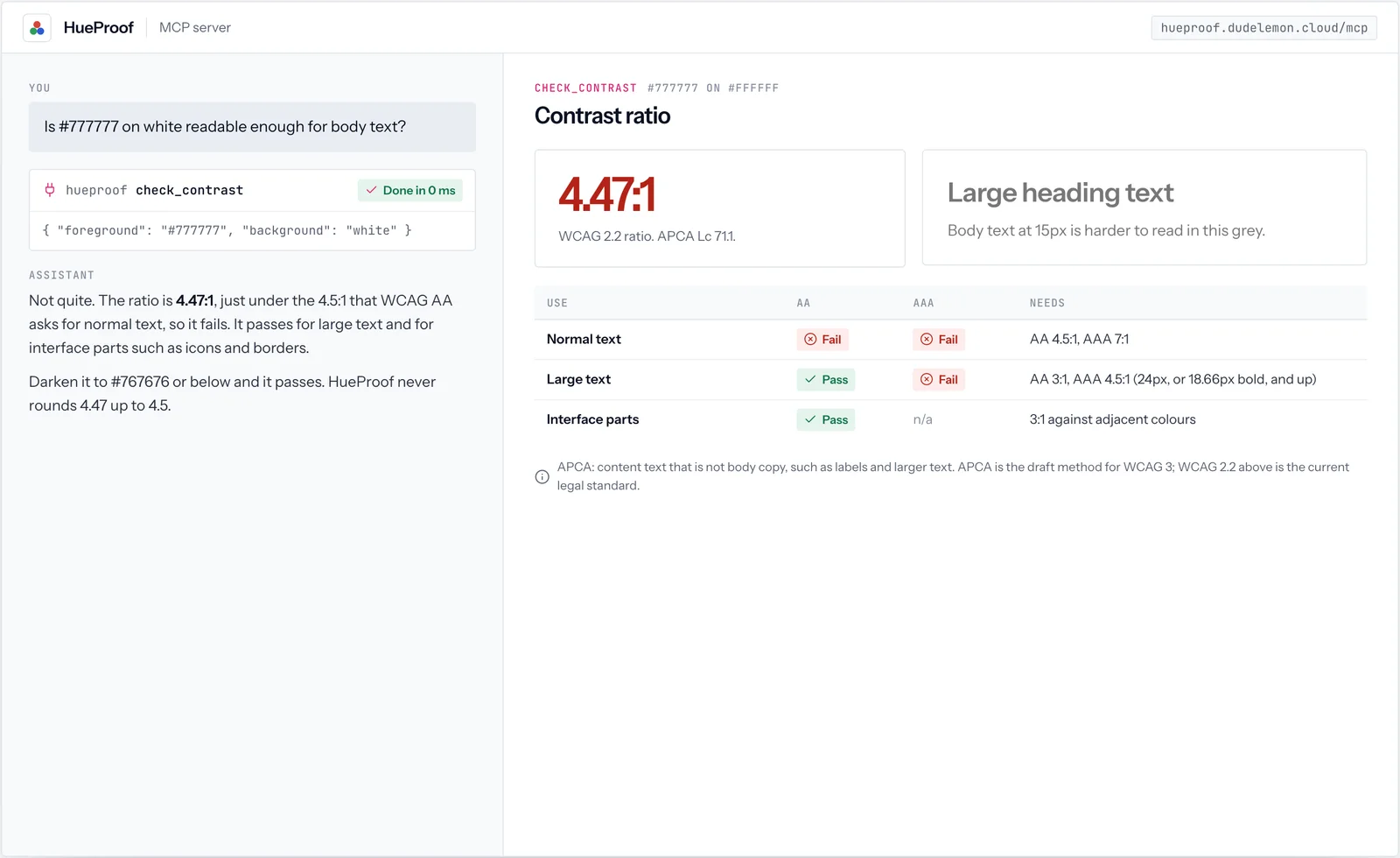
WCAG measures contrast from 1:1, the same color twice, to 21:1, black on white. Three thresholds matter, and a pair either clears them or it does not. HueProof never rounds up, so #777777 on white, at 4.47:1, fails the 4.5:1 line.
04WCAG 2.2
The WCAG contrast ratio: thresholds and formula.
WCAG 2.2 is the standard written into accessibility law and procurement. These are the ratios it asks for, and how the ratio is worked out.
| What | AA | AAA |
|---|---|---|
| Body text | 4.5:1 | 7:1 |
| Large text: 24px, or 18.66px bold | 3:1 | 4.5:1 |
| Icons, borders and form controls | 3:1 | n/a |
// each channel from 0-255 to 0-1, then linear
c = c <= 0.04045 ? c / 12.92
                 : ((c + 0.055) / 1.055) ** 2.4

L = 0.2126 R + 0.7152 G + 0.0722 B

ratio = (L_lighter + 0.05) / (L_darker + 0.05)05WCAG 3 draft
APCA, the contrast method proposed for WCAG 3.
APCA scores contrast as Lc, from 0 to about 106, and knows that light text on dark reads differently from dark on light. It is not yet a legal standard, so HueProof reports it beside the WCAG 2.2 result, never instead of it.
| APCA Lc | What HueProof says it is suitable for |
|---|---|
| 90 and above | Any text, including thin and small body text |
| 75 | Body text, the minimum for paragraphs |
| 60 | Content text that is not body copy, such as labels and larger text |
| 45 | Headlines and large text only |
| 30 | Placeholder text, disabled states and non-text elements |
| 15 | Non-text dividers only |
06Color space
Why HueProof works in OKLCH.
OKLCH describes a color by lightness, chroma and hue, and its lightness matches what eyes see. That is why HueProof can fix contrast by moving lightness alone and keep the hue, and why its palettes look evenly spaced.
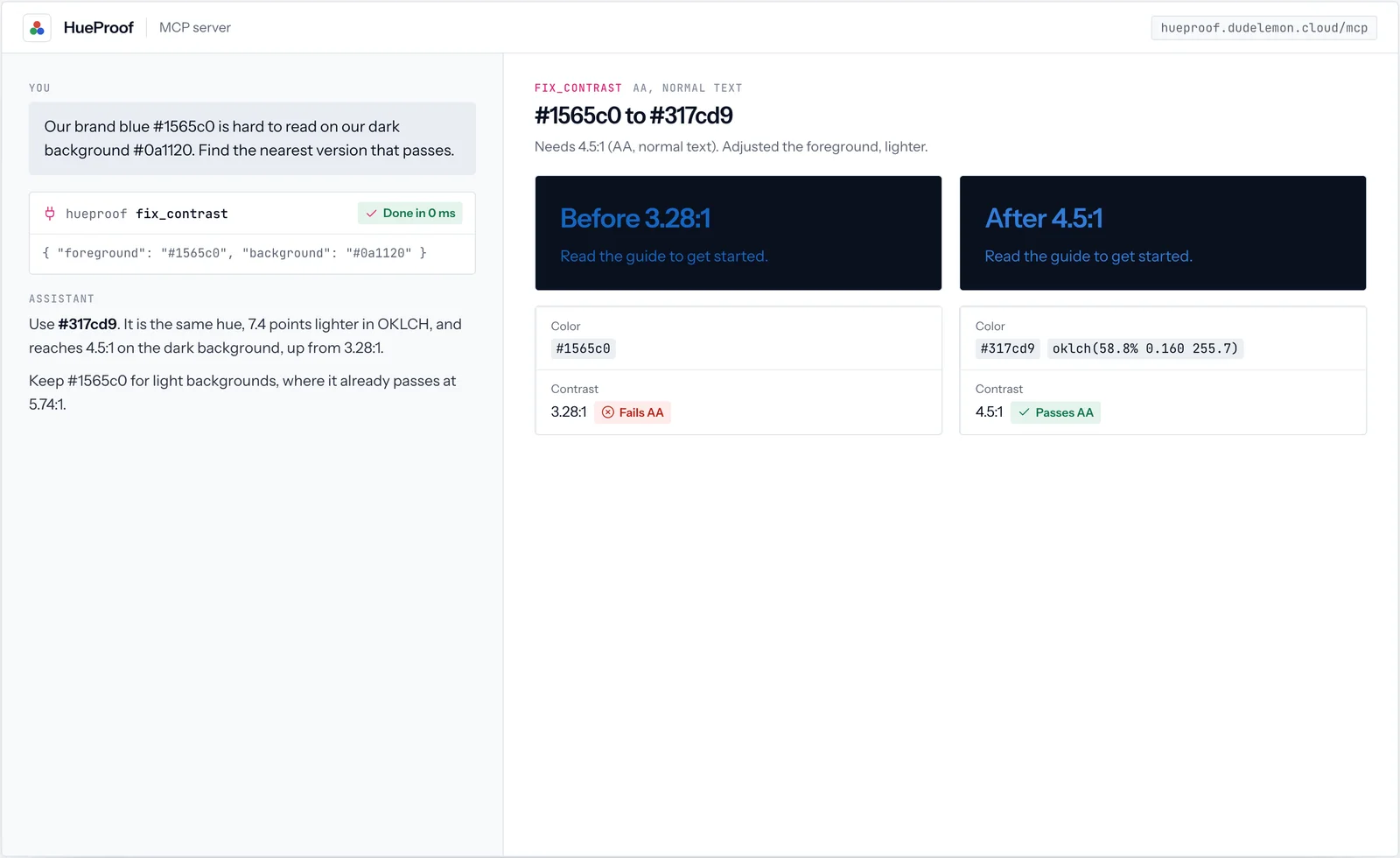
/* before */  color: #1565c0;
/* after  */  color: oklch(58.8% 0.160 255.7);
              /* #317cd9, 4.5:1, hue kept */
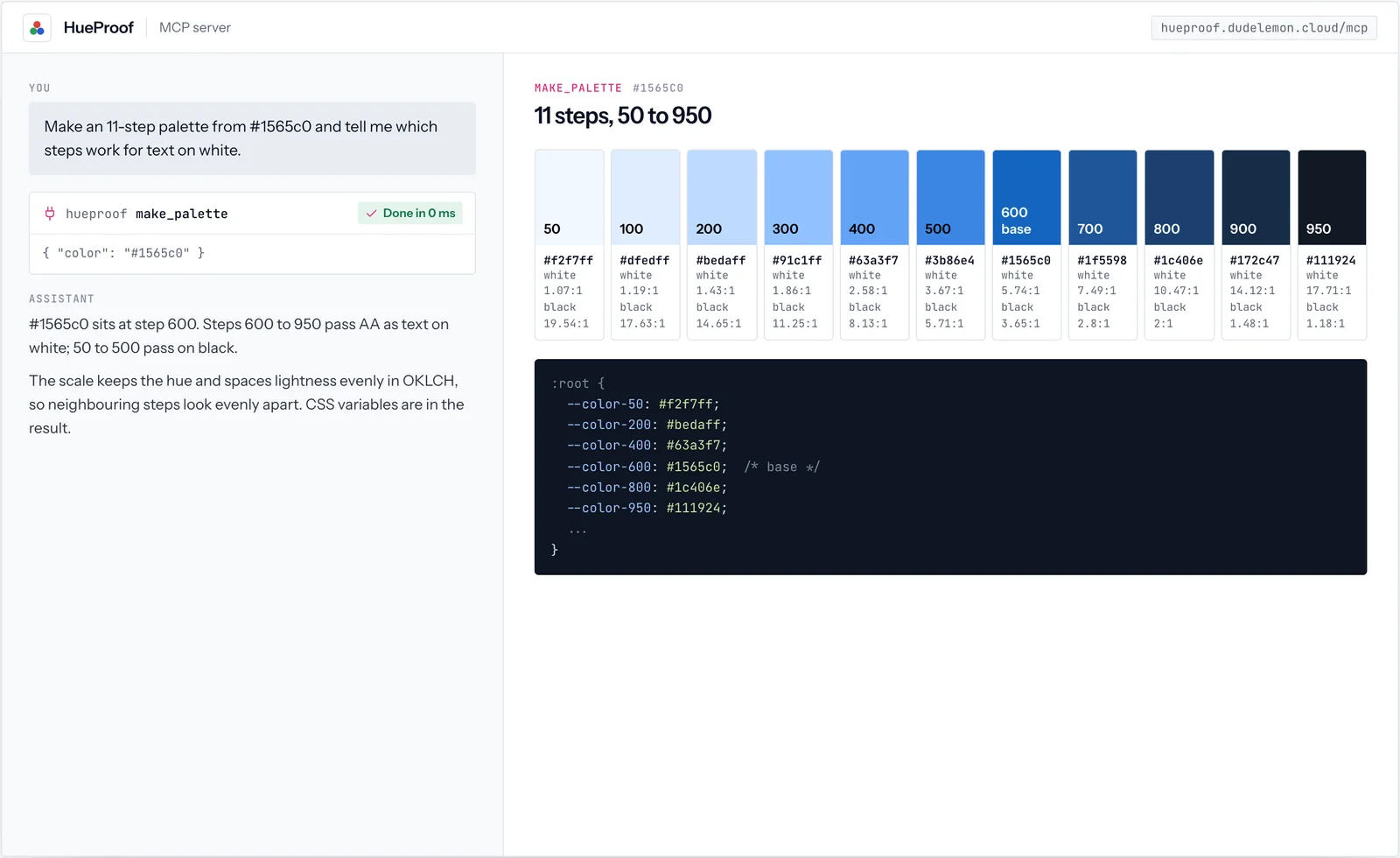
The same idea builds a palette: make_palette places your color at the step its lightness suits, then spaces eleven steps evenly in OKLCH lightness, from 50 to 950, with the contrast of each step on white and on black. You get ready CSS variables and know before you use a step whether it works for text.
07Color vision
Color blind friendly palettes.
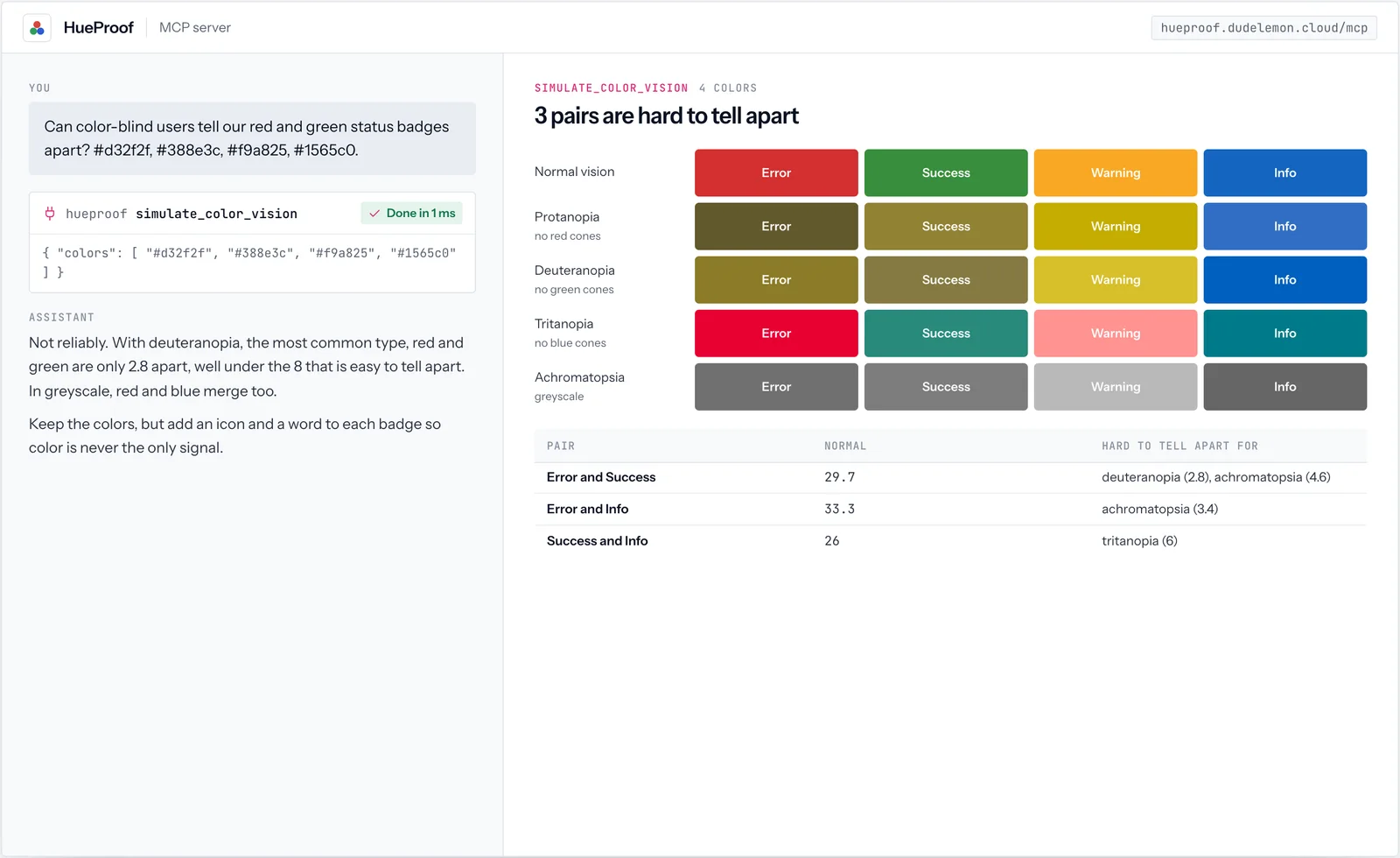
Red-green color blindness is by far the most common type. simulate_color_vision shows each color as people with each type see it, and flags pairs that come out closer than 8 in OKLab distance. A typical status set:
| Pair | Normal vision | Hard to tell apart with |
|---|---|---|
| Error #d32f2f and success #388e3c | 29.7 | Deuteranopia (2.8) and greyscale (4.6) |
| Error #d32f2f and info #1565c0 | 33.3 | Greyscale (3.4) |
| Success #388e3c and info #1565c0 | 26.0 | Tritanopia (6.0) |
08Install
Install HueProof.
HueProof runs on our servers, so there is nothing to download. Add its address to your assistant, and its 5 tools appear the next time you start a conversation.
claude mcp add --transport http hueproof https://hueproof.dudelemon.cloud/mcpRun in your terminal. Add --scope user to make it available in every project.
09Tools
Its tools, and what each returns.
check_contrast- WCAG 2.2 ratio with AA and AAA results for normal text, large text and interface components, plus APCA Lc.
fix_contrast- The nearest passing color, found by moving lightness in OKLCH and keeping the hue.
convert_color- Hex, rgb, hsl, oklch and oklab, luminance, nearest CSS name, and the readable text color on it.
make_palette- An 11-step scale from 50 to 950 with contrast for each step and ready CSS variables.
simulate_color_vision- How colors look with protanopia, deuteranopia, tritanopia and achromatopsia, and which pairs become hard to tell apart.
10Ask in your own words
Say what you need. HueProof does the exact part.
You do not call HueProof’s tools by name. Ask your assistant, and it calls them when the question needs live, exact data.
- Does #777777 text on white pass WCAG AA?
- Our brand blue fails on dark backgrounds; find the nearest version that passes.
- Make an 11-step palette from #1565c0 as CSS variables.
- Can color-blind users tell our red and green status badges apart?



FAQ
HueProof, answered
Anything we have not answered here, ask us directly. A senior engineer replies.
Which contrast standard does it use?
WCAG 2.2, the current standard in accessibility law and procurement, with ratios that are never rounded up (4.49 fails 4.5). It also reports APCA, the method proposed for WCAG 3, as extra guidance.
What color formats can I use?
Hex (3, 4, 6 or 8 digits), rgb(), hsl(), oklch(), oklab() and the 148 CSS color names. A transparent foreground is blended over its background first.
How does color-blindness simulation work?
With the Machado, Oliveira and Fernandes (2009) model at full severity, applied in linear RGB, plus a greyscale view. Pairs closer than 8 in OKLab distance are flagged as hard to tell apart.
Is HueProof free?
Yes. HueProof is free and needs no account or API key.
How do I install HueProof?
Add https://hueproof.dudelemon.cloud/mcp to your assistant as a remote MCP server. In Claude Code run claude mcp add --transport http hueproof https://hueproof.dudelemon.cloud/mcp; in the Claude apps add it as a custom connector with no sign-in; in Cursor or VS Code add it to mcp.json.
Should I design to APCA or WCAG 2.2?
Meet WCAG 2.2, since that is what laws and contracts reference. Use APCA as extra guidance, especially for light text on dark backgrounds, where WCAG 2 is known to be generous.