
MCP servers
Free MCP servers that give your AI assistant exact answers.
Five free MCP servers that give Claude, Cursor, VS Code and other MCP clients tools they cannot fake: an SEO and AI crawler checker, DNS and email authentication checks, a business days calculator, a time zone converter and a WCAG color contrast checker. Each one is a single address you add to your assistant. No account, no API key, nothing to install.
01MCP servers
Five MCP servers, one job each.
Each MCP server does one thing well. Open one for what it does, real output, and how to install it.
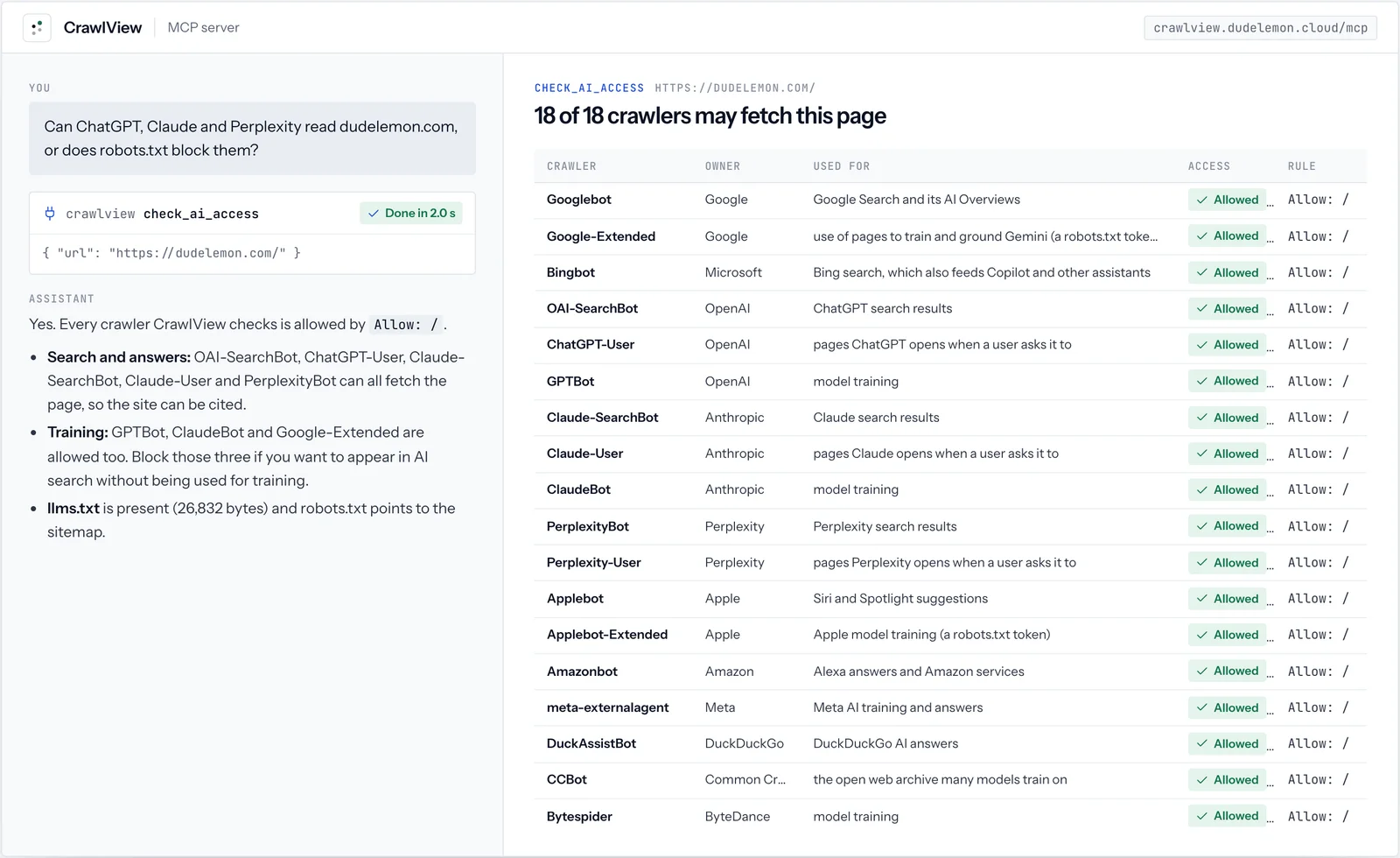
 CrawlViewMCP serverSee any web page the way search engines and AI crawlers see it.
 DomainProbeMCP serverDNS, email authentication, certificates and security headers for any domain.
 DayCountMCP serverPublic holidays and exact business-day maths for about 200 countries.
 HourLineMCP serverTime zone conversions, meeting overlaps and daylight saving changes, done exactly.
 HueProofMCP serverColor contrast, accessible fixes, palettes and color-blindness checks.
02Real output
All five, in real use.
Pick a MCP server to see its screens from real runs. Every value shown is what the tool returned.
03The basics
What an MCP server does, step by step.
MCP, the Model Context Protocol, is the open standard assistants use to call outside tools. You never call a tool yourself: you ask, and the assistant decides which tool to call and what to send it.
- 01You askWhen does the certificate on our site expire?
- 02The assistant reads the tool listEach server describes its tools and the inputs they take.
tools/list - 03It calls the right toolWith the arguments it worked out from your question.
tools/call check_certificate - 04It answers from the resultExact values from a live lookup, not a guess from training data.
04Set up
How to add an MCP server to Claude Code, Claude Desktop, Cursor and VS Code.
Each of our servers is a remote MCP server: one HTTPS address, no key and nothing to run on your machine. This is the setup for CrawlView; the others differ only in name and address.
| Client | Where | What to add |
|---|---|---|
| Claude Code | Your terminal | claude mcp add --transport http crawlview https://crawlview.dudelemon.cloud/mcp |
| Claude Desktop and claude.ai | Customize, Connectors, Add custom connector | Name: CrawlView. URL: https://crawlview.dudelemon.cloud/mcp. No sign in. |
| Cursor | ~/.cursor/mcp.json | { "mcpServers": { "crawlview": { "url": "https://crawlview.dudelemon.cloud/mcp" } } } |
| VS Code | .vscode/mcp.json | { "servers": { "crawlview": { "type": "http", "url": "https://crawlview.dudelemon.cloud/mcp" } } } |
| Any other client | Its remote server settings | https://crawlview.dudelemon.cloud/mcp over Streamable HTTP, no headers needed |
05Side by side
The five servers, and what each answers.
Pick by the question you want answered exactly. All five are free and use the same setup.
| Server | Answers questions about | Tools | Ask it |
|---|---|---|---|
| CrawlView | SEO and AI crawler access for any page | 5 | Can ChatGPT and Claude read our blog? |
| DomainProbe | DNS, SPF, DKIM and DMARC, certificates, security headers, registration | 5 | Why might email from our domain land in spam? |
| DayCount | Business days and public holidays in about 200 countries | 6 | What date is 10 business days from today in Germany? |
| HourLine | Time zones, meeting times and daylight saving changes | 5 | Find a 30-minute slot for Sydney, Berlin and Toronto. |
| HueProof | WCAG and APCA contrast, accessible fixes, palettes, color blindness | 5 | Does #777777 text on white pass WCAG AA? |
06Install
One address per server.
Every server is a single HTTPS address, such as https://crawlview.dudelemon.cloud/mcp. Add it to your assistant and its tools appear. The example on the right is CrawlView; each server’s page shows its own address and setup for Claude Code, the Claude apps, Cursor and VS Code.
claude mcp add --transport http crawlview https://crawlview.dudelemon.cloud/mcpRun in your terminal. Add --scope user to make it available in every project.
07Why these
Built to be relied on, not just demoed.
Exact, not estimated
Language models guess at dates, offsets, contrast ratios and DNS. These servers calculate or look them up, so the answer is right the first time.
Live data
Every call fetches the page, queries the resolver or reads the holiday calendar at that moment. Nothing is cached between calls.
Read only and private
The tools only read public information. They log the tool name and how long it took, never the address or text you asked about.
One line to add
Each server is one HTTPS address. Add it to Claude, Cursor or VS Code and its tools appear. There is nothing to run on your machine.
08More tools
The rest of the toolkit.
FAQ
MCP servers, answered
Anything we have not answered here, ask us directly. A senior engineer replies.
What is an MCP server?
MCP, the Model Context Protocol, is an open standard that lets AI assistants call outside tools. An MCP server offers a set of tools, such as "check the DNS records of a domain", and the assistant decides when to call them while it works on your request.
Do I need an account or an API key?
No. Each server is a public HTTPS endpoint. Add the address to your assistant and the tools are available straight away.
Which assistants can use them?
Any client that supports remote MCP servers over Streamable HTTP: Claude Code, the Claude apps through custom connectors (the Free plan allows one), Cursor, VS Code and others. The servers speak both the current stateless protocol and the earlier initialize handshake, so older clients connect too.
What do you log?
For each call we record the server, the tool name and how long it took, to keep the service healthy. We do not record the URLs, domains, dates or colors you ask about, and no result is stored.
Are there limits?
Each address can make 120 requests a minute to a server. Page fetches are capped at a few megabytes and about twelve seconds, and the servers refuse private network addresses.
Are they free?
Yes. All five servers are free to use.
Built to order
Need an MCP server or plugin for your own product?
We design, build and host MCP servers, skills and plugins that connect AI assistants to your systems and data, the same way we built these.