

Time zone converter, and an MCP server that does it for your assistant.
HourLine is a time zone converter and meeting planner your AI assistant can call. It converts a time between places with daylight saving built in, shows the time now in several cities, finds meeting slots inside everyone’s working hours across time zones, and says when the clocks next change, all from the IANA time zone database. It flags times that do not exist or happen twice on the day the clocks move.
01Free time zone converter
Time zone converter, daylight saving included.
Pick a date, a time and a city to see it everywhere else, with each city’s offset and whether it falls in working hours. It runs in your browser on its time zone database; HourLine gives your AI assistant the same answers.
02See it work
HourLine, in real use.
5 screens from real calls to HourLine. Every value shown is what the tool returned; click a screen to open it full size.
03How it works
The two nights a year when clocks lie.
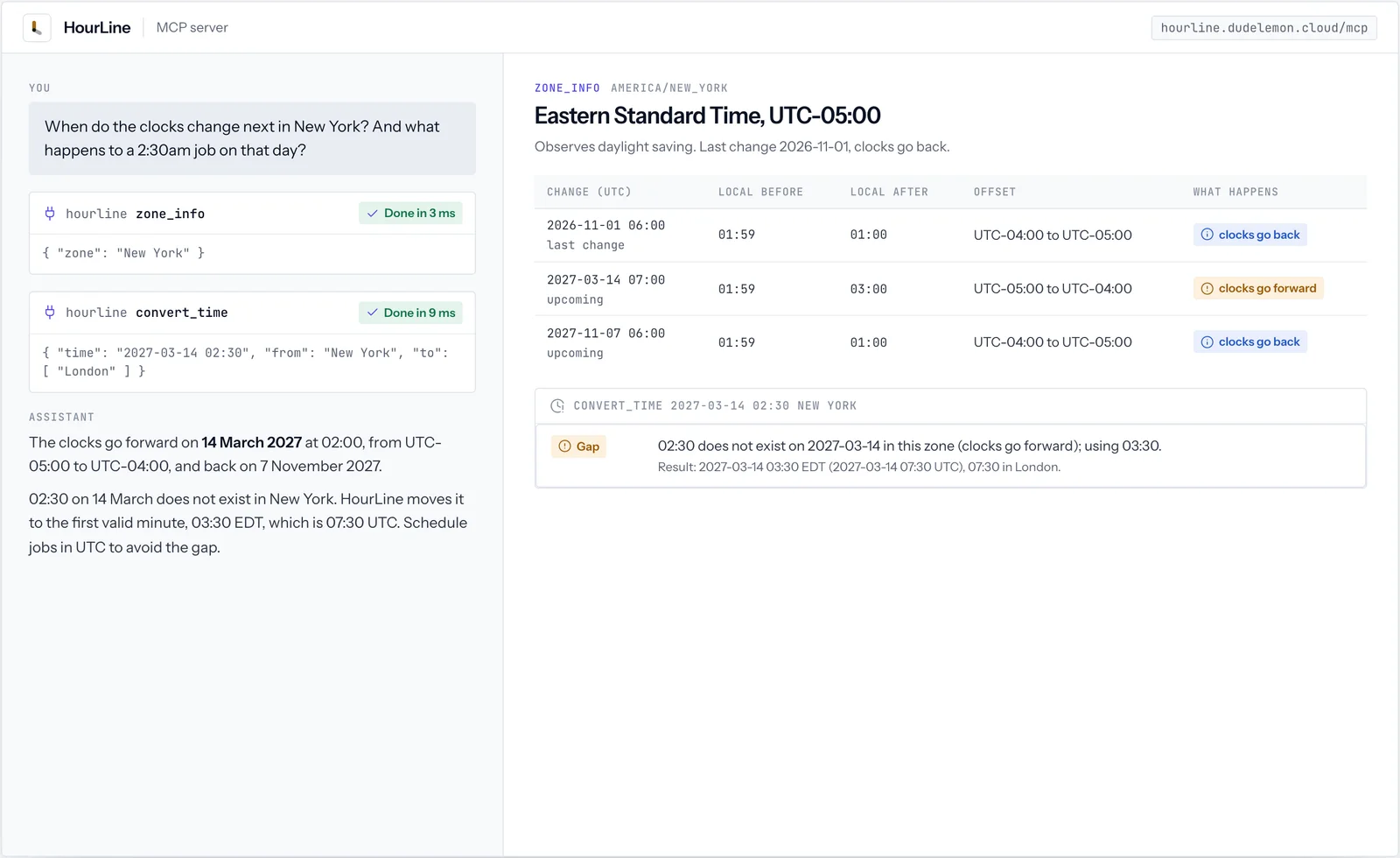
Most time zone mistakes happen around daylight saving changes. HourLine reads every change from the time zone database and says what it did with a time that does not exist or happens twice. New York in 2027:
04Time zone data
Built on the IANA time zone database.
The IANA time zone database records every offset and daylight saving rule each region has used, and it is what operating systems and browsers rely on. HourLine reads it through the standard Intl library, so its answers match the clocks on your devices.
| You can write | Example | HourLine reads it as |
|---|---|---|
| An IANA zone name | Europe/London | That zone, with its full daylight saving history |
| A large city | Mumbai | Asia/Kolkata |
| A country with one zone | Mauritius | Indian/Mauritius |
| A country with several zones | United States | The list of its zones, so you can pick one |
| A fixed offset | UTC+4 | A zone that never changes its clocks |
05An example
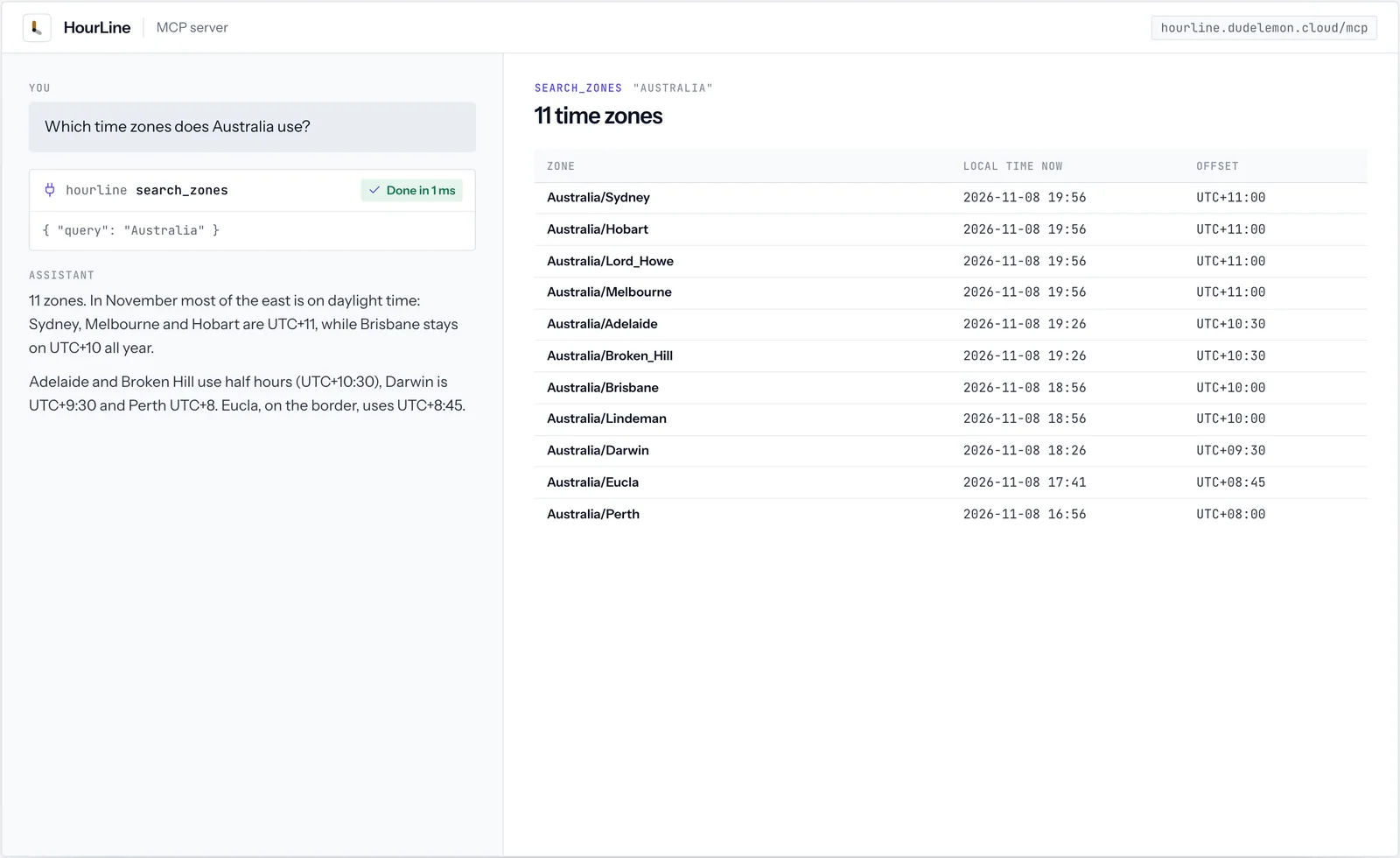
Australia's time zones, from search_zones.
Countries that span several zones are where guesses go wrong. These are the offsets search_zones returned on 8 November 2026, during the southern summer.
| Zone | Offset in November | Daylight saving |
|---|---|---|
| Australia/Sydney, Melbourne, Hobart | UTC+11:00 | Yes |
| Australia/Lord_Howe | UTC+11:00 | Yes, by 30 minutes |
| Australia/Adelaide, Broken_Hill | UTC+10:30 | Yes |
| Australia/Brisbane, Lindeman | UTC+10:00 | No |
| Australia/Darwin | UTC+09:30 | No |
| Australia/Eucla | UTC+08:45 | No |
| Australia/Perth | UTC+08:00 | No |
06Meetings
Meeting times across time zones.
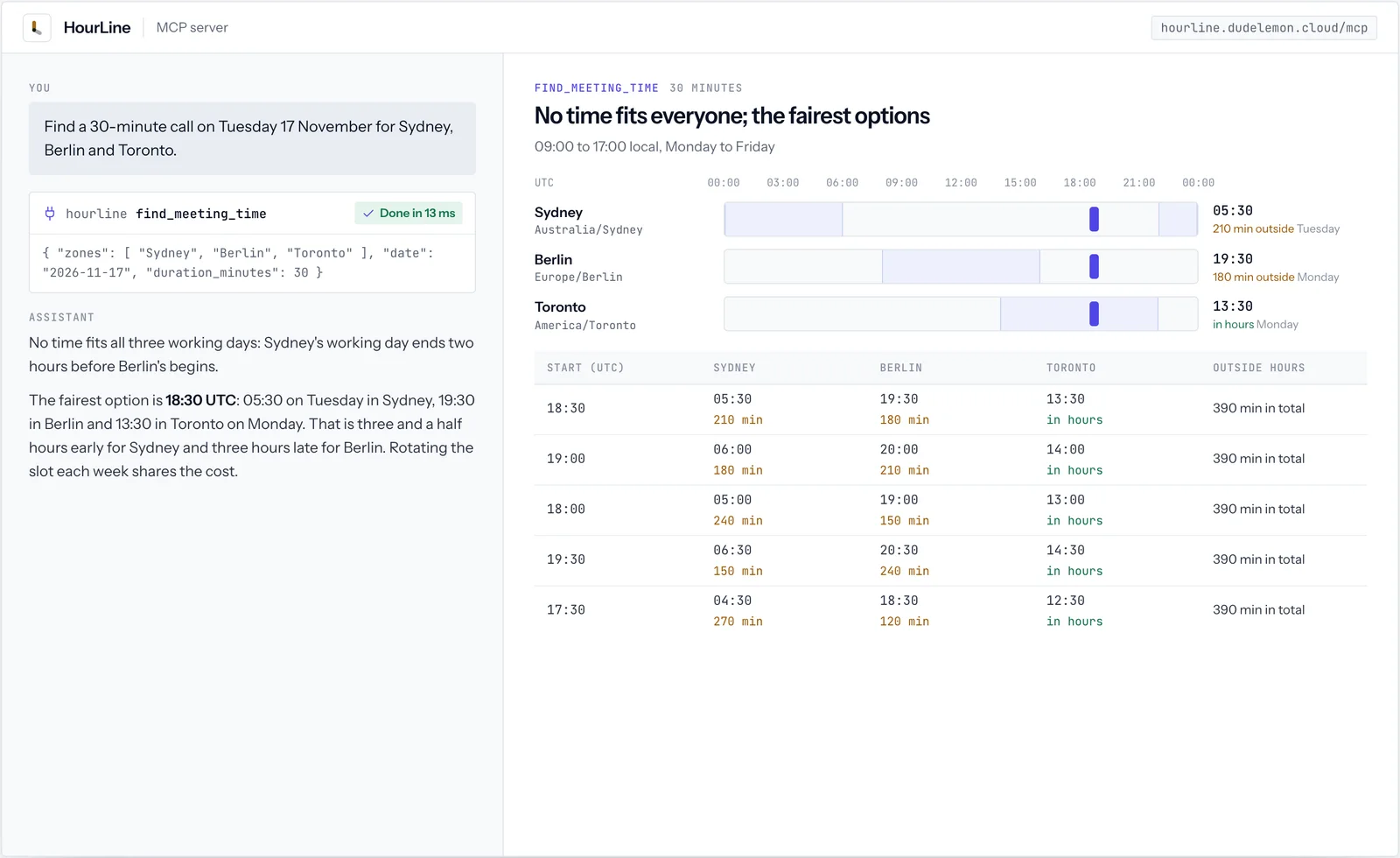
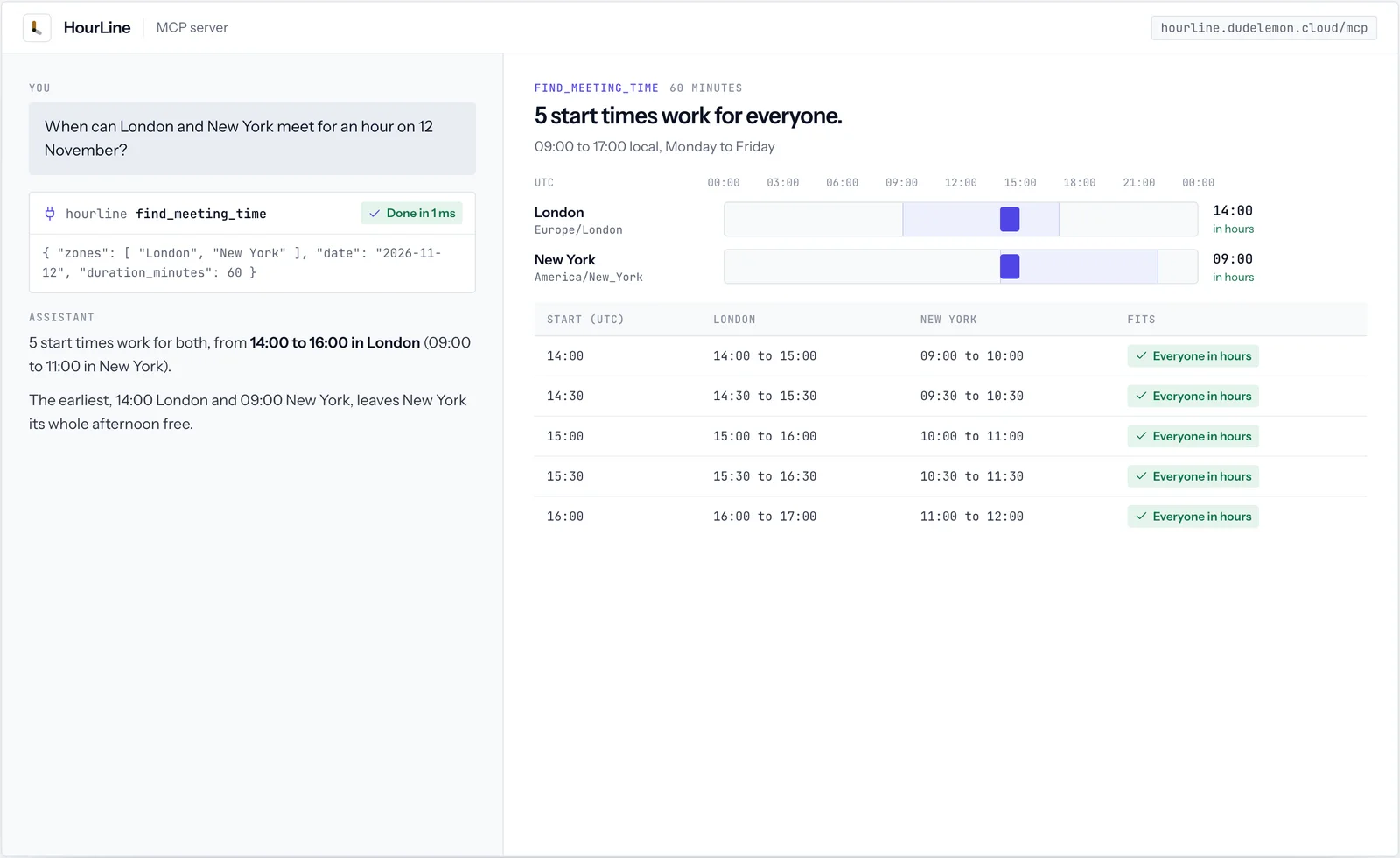
When everyone's working day overlaps, find_meeting_time lists every start time that fits. When nothing fits, it ranks the options by the smallest stretch for the worst-placed person, then by the least in total, so no one is always the one on the call at midnight. London, New York and Mumbai, 30 minutes, 12 November 2026:
| Start (UTC) | London | New York | Mumbai | Outside working hours |
|---|---|---|---|---|
| 12:30 | 12:30 | 07:30 (90 min early) | 18:00 (90 min late) | 180 minutes, split evenly |
| 12:00 | 12:00 | 07:00 (120 min early) | 17:30 (60 min late) | 180 minutes |
| 13:00 | 13:00 | 08:00 (60 min early) | 18:30 (120 min late) | 180 minutes |
07Install
Install HourLine.
HourLine runs on our servers, so there is nothing to download. Add its address to your assistant, and its 5 tools appear the next time you start a conversation.
claude mcp add --transport http hourline https://hourline.dudelemon.cloud/mcpRun in your terminal. Add --scope user to make it available in every project.
08Tools
Its tools, and what each returns.
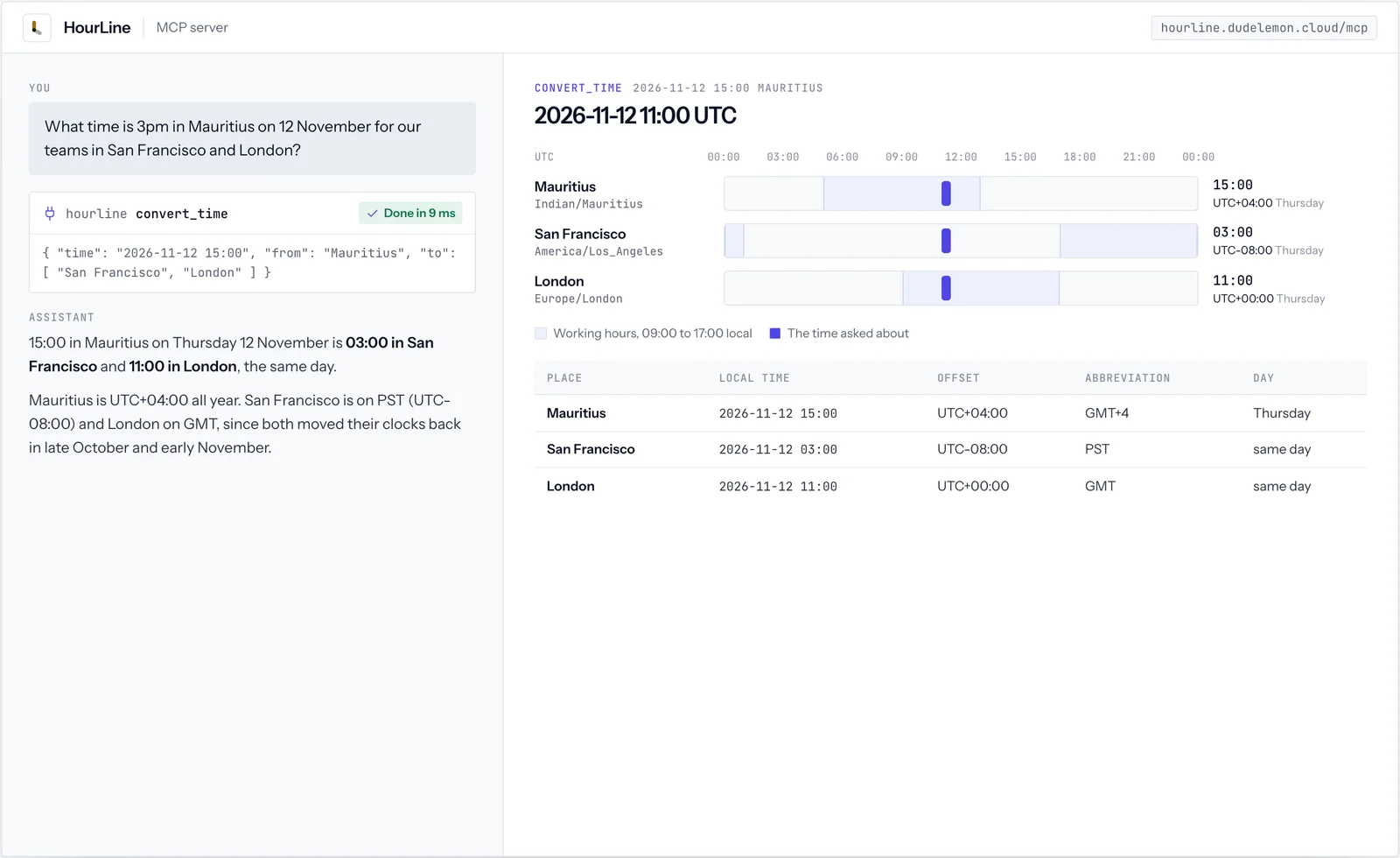
convert_time- A time in one zone in other zones, with weekday, offset, abbreviation and day difference.
current_time- The time now in several places, and whether each is inside working hours.
find_meeting_time- Start times when everyone is inside their working hours on a weekday, or, when no time fits, the options that spread the early and late hours most fairly.
zone_info- Offset, daylight saving status, and the last and next clock changes with local times.
search_zones- Zone names by city or country, including countries that span several zones.
09Ask in your own words
Say what you need. HourLine does the exact part.
You do not call HourLine’s tools by name. Ask your assistant, and it calls them when the question needs live, exact data.
- What time is 3pm in Mauritius for our teams in San Francisco and London?
- Find a 30-minute slot next Tuesday that works for Sydney, Berlin and Toronto.
- When do the clocks change in New York next?
10Works well with
Related tools.



FAQ
HourLine, answered
Anything we have not answered here, ask us directly. A senior engineer replies.
How do I name a time zone?
Use an IANA name such as Europe/London, a large city such as Mumbai or San Francisco, or an offset such as UTC+4. Countries that span several zones, such as the United States, return the list so you can pick one.
What happens when the clocks change?
A time that is skipped when clocks go forward moves to the first valid minute after it, and a time that happens twice when clocks go back takes the first occurrence. Both cases come with a note.
Can I change working hours?
Yes. find_meeting_time takes work_start and work_end, a meeting length and a step of 15, 30 or 60 minutes.
Is HourLine free?
Yes. HourLine is free and needs no account or API key.
How do I install HourLine?
Add https://hourline.dudelemon.cloud/mcp to your assistant as a remote MCP server. In Claude Code run claude mcp add --transport http hourline https://hourline.dudelemon.cloud/mcp; in the Claude apps add it as a custom connector with no sign-in; in Cursor or VS Code add it to mcp.json.
Can I use HourLine as a time zone API?
Yes. It is a public JSON-RPC endpoint at https://hourline.dudelemon.cloud/mcp. Send a tools/call request for convert_time, current_time, find_meeting_time, zone_info or search_zones, as an MCP client would.