
Claude skills
Claude skills that do the job, and check their own work.
Five Claude skills, which Anthropic calls Agent Skills, for Claude Code and the Claude apps. Each is a folder of instructions plus a script that does the part a model should not do by eye: scanning prose for templated phrases, validating schema markup, collecting a site’s pages for llms.txt, grouping git history into release notes, or profiling every row of a CSV.
01Claude skills
Five Claude skills, one job each.
Each Claude skill does one thing well. Open one for what it does, real output, and how to install it.
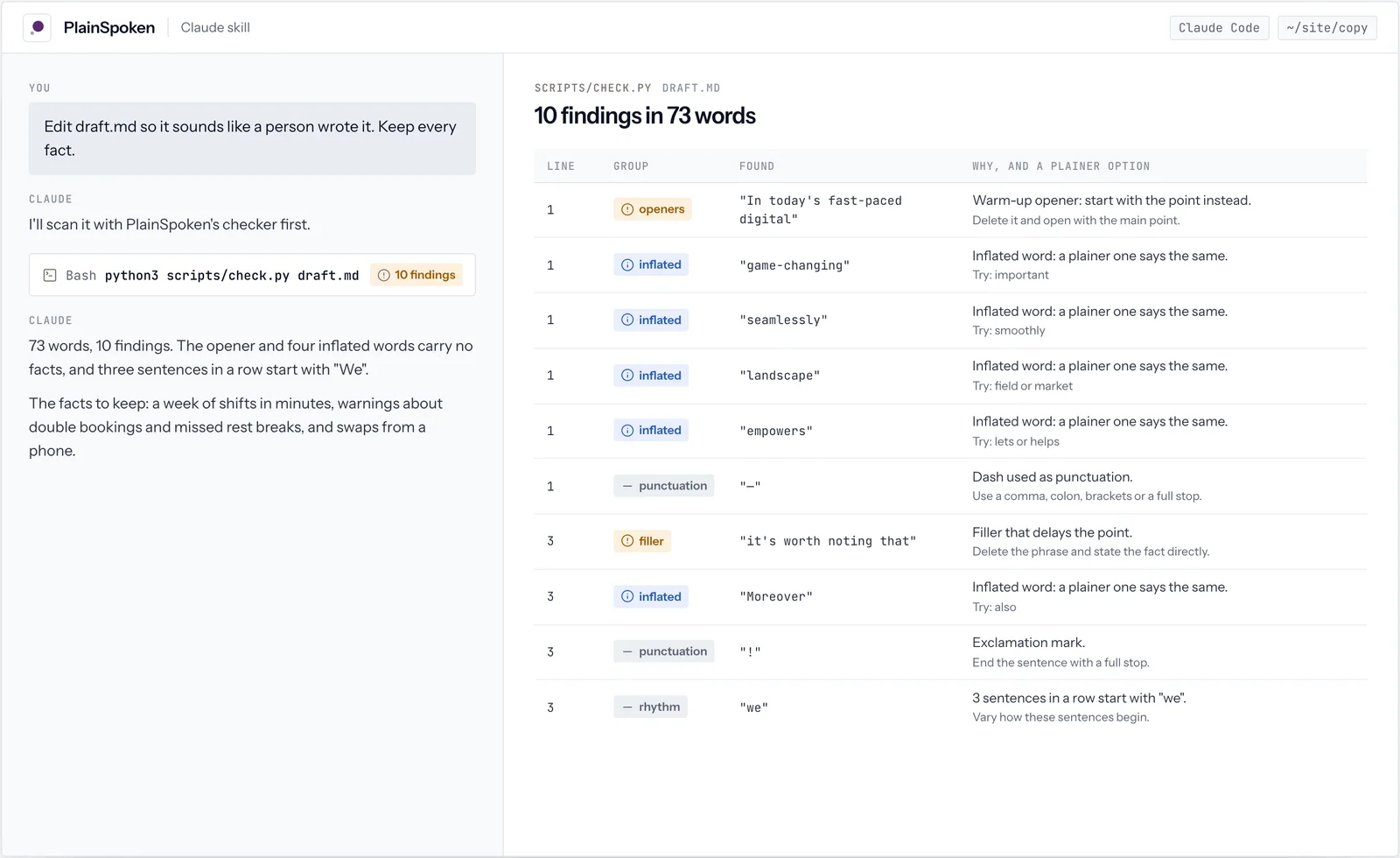
 PlainSpokenClaude skillEdits prose so it reads like a person wrote it, not a template.
 SchemaWrightClaude skillWrites correct JSON-LD structured data and validates it against Google’s rules.
 SignPostClaude skillBuilds a curated llms.txt so AI assistants find a site’s best pages.
 ShipNotesClaude skillTurns git history into release notes customers want to read.
 ColumnistClaude skillProfiles a CSV or spreadsheet export before you trust it, then cleans it safely.
02Real output
All five, in real use.
Pick a Claude skill to see its screens from real runs. Every value shown is what the tool returned.
03The basics
Anthropic skills, and how Claude loads them.
Claude skills, which Anthropic calls Agent Skills, are folders of instructions, scripts and references. Claude loads them in stages, so installing several costs almost nothing until one is needed.
- 01Always: name and descriptionA few lines per skill, so Claude knows what it can do.
- 02A task matchesClaude reads that skill's SKILL.md: the workflow and its rules.
- 03Scripts when neededIt runs the script for the exact part, such as validating JSON-LD.
- 04Checks its workEach of our skills runs its script again before handing back.
04Set up
How to install Claude skills.
Three ways, depending on where you use Claude. PlainSpoken is the example; every skill works the same way.
| Where | How | Who gets it |
|---|---|---|
| Claude Code, from the marketplace | /plugin marketplace add https://plugins.dudelemon.cloud/marketplace.json then /plugin install plainspoken@dudelemon | You, in every project |
| Claude Code, as a folder | Unzip plainspoken.zip into ~/.claude/skills/ (personal) or .claude/skills/ in a repository (shared with the team) | You, or everyone who clones the repository |
| Claude apps | Download plainspoken.zip and upload it under Customize, Skills | Your Claude account |
05Inside one
What is inside a skill folder.
A real example: SchemaWright. The frontmatter is what Claude always sees; the rest loads only when a task needs it.
schemawright/
├── SKILL.md              the workflow and rules
├── references/
│   └── types.md          15 schema.org types
└── scripts/
└── validate.py the validator---
name: schemawright
description: Write correct JSON-LD structured data
(schema.org) for a web page and validate it against
Google's rich result requirements. ... Use when adding
or fixing schema markup, structured data or rich
snippets ...
license: MIT
---06Side by side
The five skills, and the script behind each.
Every skill pairs instructions with a small Python script for the part a model should not do by eye.
| Skill | The job | Its script | Needs |
|---|---|---|---|
| PlainSpoken | Edits prose into plain, human writing | scripts/check.py | Python 3.8+ |
| SchemaWright | Writes and validates JSON-LD structured data | scripts/validate.py | Python 3.8+ |
| SignPost | Builds a curated llms.txt and checks its links | scripts/collect.py | Python 3.8+, internet |
| ShipNotes | Turns git history into release notes | scripts/changes.py | Python 3.8+, git |
| Columnist | Profiles and cleans CSV and spreadsheet exports | scripts/profile.py | Python 3.8+ |
07Install
One marketplace for all of them.
Add the Dude Lemon marketplace to Claude Code once with /plugin marketplace add https://plugins.dudelemon.cloud/marketplace.json, then install any of our tools by name with /plugin install <name>@dudelemon. For the Claude apps, each skill has a zip to upload.
/plugin marketplace add https://plugins.dudelemon.cloud/marketplace.json/plugin install plainspoken@dudelemonClaude uses the skill when a task matches its description. You can also call it directly with /plainspoken:plainspoken.
08Why these
Built to be relied on, not just demoed.
Scripts, not guesswork
Each skill runs a small Python script for the mechanical part, so findings come with line numbers, counts and exact values.
A workflow, not a prompt
The instructions walk Claude through the whole job: gather, decide, write, then check the result again before handing it back.
Runs where you work
Skills run in your Claude Code project or in the Claude apps’ code environment. Your files stay with you.
Yours to change
Every skill is MIT licensed and readable. Edit the phrase list, the rules or the templates to fit your house style.
09More tools
The rest of the toolkit.
FAQ
Claude skills, answered
Anything we have not answered here, ask us directly. A senior engineer replies.
What are Claude skills?
Claude skills, also called Agent Skills, are folders with a SKILL.md file of instructions and, often, scripts and reference files. Claude loads it only when a task matches its description, so a skill adds expertise without filling every conversation with instructions.
How do I install Claude skills in Claude Code?
Add the Dude Lemon marketplace once with /plugin marketplace add https://plugins.dudelemon.cloud/marketplace.json, then install a skill with /plugin install <name>@dudelemon. You can also unzip a skill into ~/.claude/skills/.
How do I use Claude skills in Claude.ai and the Claude apps?
Download the skill’s zip file from its page and upload it under Customize, Skills. The zip holds the skill folder at its top level, the layout the Claude apps expect.
Do the scripts need anything installed?
Python 3.8 or later. The scripts use only the standard library. ShipNotes also needs git, and SignPost needs internet access to the site it reads.
Are they free?
Yes. All five skills are free and MIT licensed.
Built to order
Need an MCP server or plugin for your own product?
We design, build and host MCP servers, skills and plugins that connect AI assistants to your systems and data, the same way we built these.