

A schema markup generator that validates its own work.
SchemaWright is a schema markup generator and validator for Claude. It writes JSON-LD for a page from what the page actually shows, using templates for Organization, Product, SoftwareApplication, Article, LocalBusiness, FAQPage, Event, JobPosting, VideoObject and more. Its schema validator then checks every block for missing required properties, wrong formats and policy problems such as self-serving reviews, and Claude fixes what it reports.
01See it work
SchemaWright, in real use.
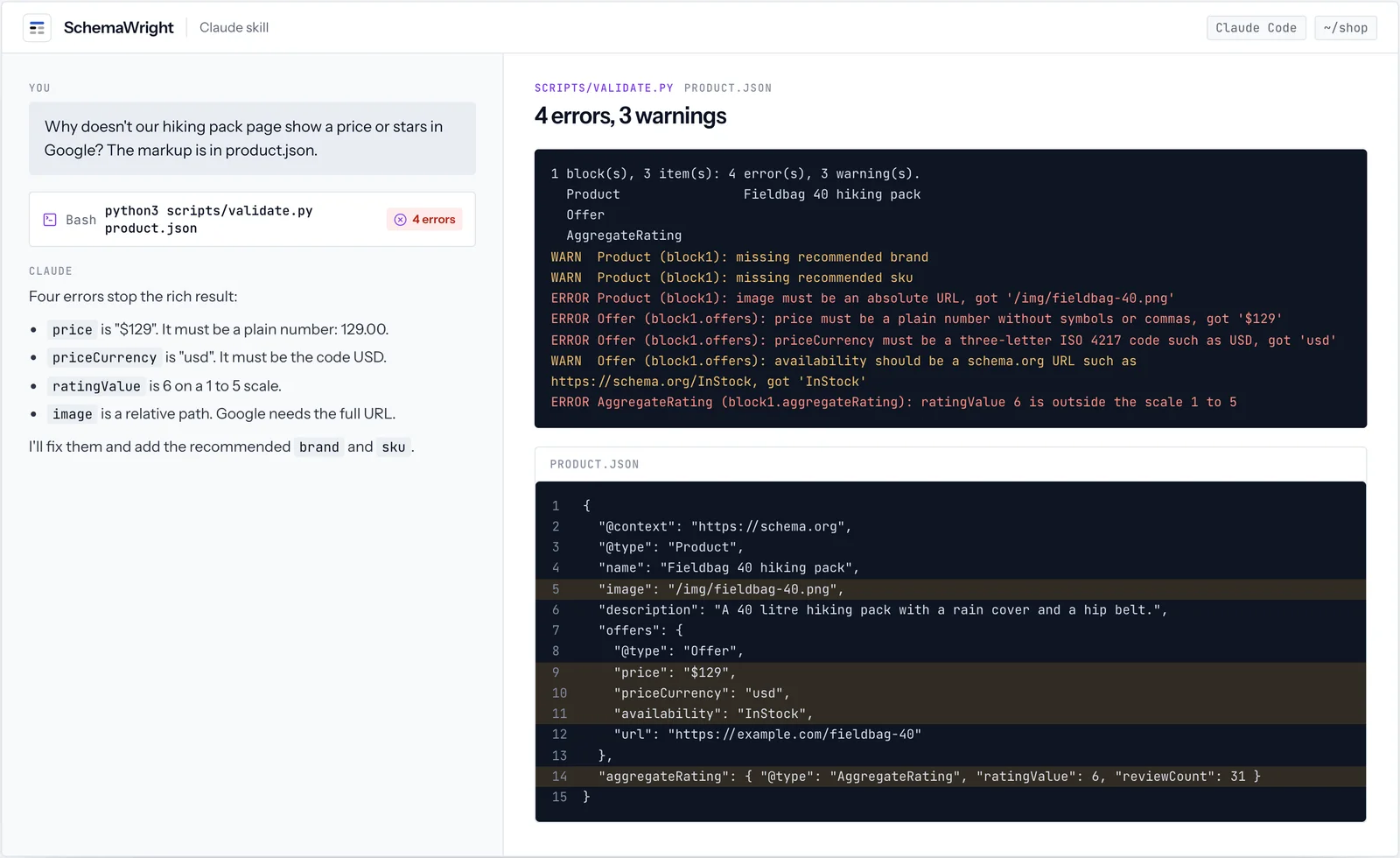
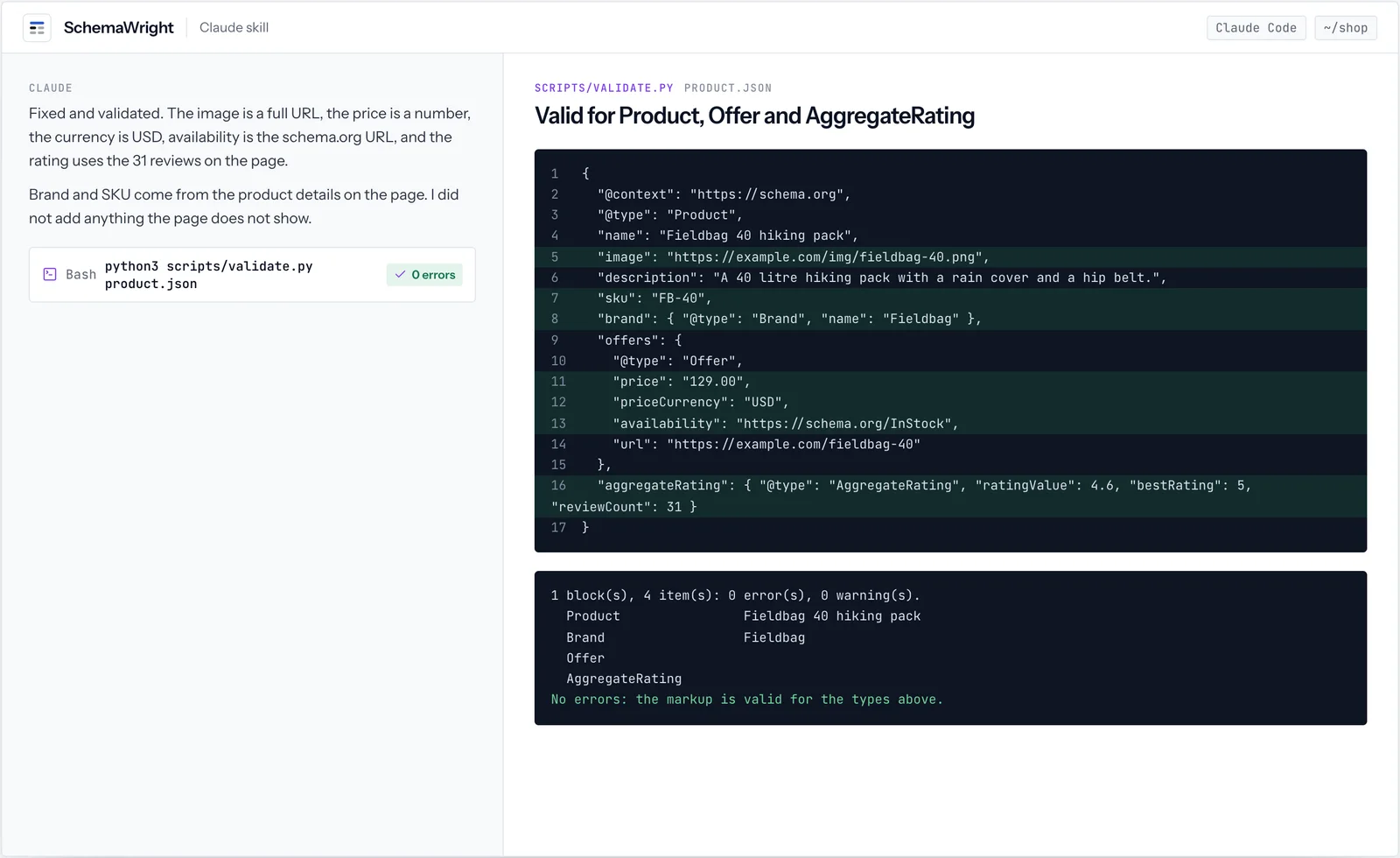
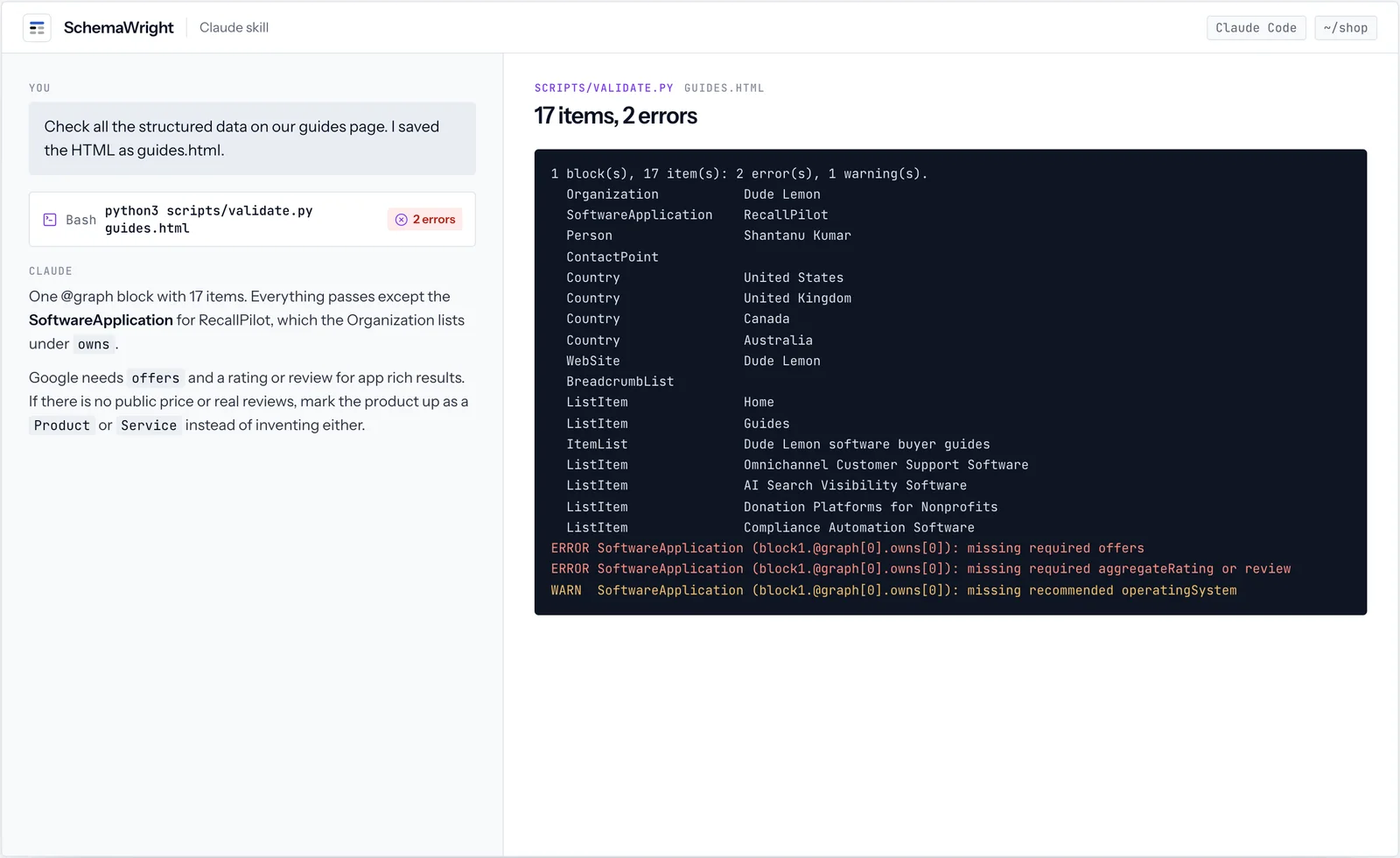
3 screens from real runs of SchemaWright. Every value shown is what the tool returned; click a screen to open it full size.
02How it works
From what the page shows to markup Google accepts.
Structured data must describe what a visitor can see on the page. SchemaWright starts from the page, not from a template, and checks its own output before handing it back.
- 01Read the pageNames, prices, ratings and dates that are actually visible.
- 02Choose the typesFrom 15 schema.org types with their required and recommended properties.
references/types.md - 03Write JSON-LDOne @graph per page, entities linked by @id, absolute URLs and ISO dates.
- 04Validate and fixvalidate.py checks every block; Claude fixes what it reports.
scripts/validate.py
03The format
JSON-LD, the format Google recommends.
JSON-LD is a script block in the page that describes it as data. One @graph can hold every entity, linked by @id, so the organization is described once and referenced everywhere.
<script type="application/ld+json">
{
  "@context": "https://schema.org",
  "@graph": [
    { "@type": "Organization", "@id": "https://example.com/#org",
      "name": "Example Outdoors", "url": "https://example.com/",
      "logo": "https://example.com/logo.png" },
    { "@type": "WebSite", "@id": "https://example.com/#site",
      "url": "https://example.com/", "publisher": { "@id": "https://example.com/#org" } },
    { "@type": "Product", "name": "Fieldbag 40 hiking pack",
      "brand": { "@type": "Brand", "name": "Fieldbag" },
      "offers": { "@type": "Offer", "price": "129.00", "priceCurrency": "USD",
                  "availability": "https://schema.org/InStock" } }
  ]
}
</script>04Product
Product schema: what Google requires.
These are the rules validate.py applies to products, and the errors it found in a real draft before the fix.
| Property | Rule | Error validate.py reported in the draft |
|---|---|---|
| name | Required | |
| offers, review or aggregateRating | At least one is required for a product snippet | |
| offers.price | A plain number, no currency symbol or commas | price must be a plain number, got "$129" |
| offers.priceCurrency | A three-letter ISO 4217 code | priceCurrency must be ... such as USD, got "usd" |
| offers.availability | A schema.org URL | should be https://schema.org/InStock, got "InStock" |
| aggregateRating.ratingValue | Inside the rating scale (1 to 5 by default) | ratingValue 6 is outside the scale 1 to 5 |
| image | An absolute URL | image must be an absolute URL, got "/img/fieldbag-40.png" |
| brand, sku | Recommended | missing recommended brand, sku |
05Other types
FAQ, Organization, review and software schema.
Each type has its own rules, and some carry policies that valid markup alone does not satisfy.
| Type | What it needs | The policy to know |
|---|---|---|
| FAQPage | Question and answer text that is visible on the page | Since August 2023 Google shows FAQ rich results only for well-known government and health sites. The markup still helps AI answers. |
| Organization | name and url; logo and sameAs recommended | Describe it once with an @id and reference it from every page. |
| Review and AggregateRating | A rating inside its scale and a count | Reviews a business publishes about itself are not shown as stars. SchemaWright warns and never invents ratings. |
| SoftwareApplication | offers (price 0 if free) and aggregateRating or review | Without a real rating, describe the software as a Product or Service instead. |
06Testing
SchemaWright and the Rich Results Test.
Google's Rich Results Test is the final word on what Google will show. SchemaWright catches problems earlier, where you work.
| SchemaWright validate.py | Rich Results Test | |
|---|---|---|
| When it runs | Before you deploy, on a JSON file, an HTML file or a pipe | On a live URL or pasted code |
| Where | Your terminal, Claude Code or CI; exit code 1 on errors | In the browser |
| Policy warnings | Self-serving reviews, ratings without counts, invented data | Eligibility for each rich result |
| Best used | While writing and in every pull request | Once the page is live |
07Install
Install SchemaWright.
Install SchemaWright in Claude Code from the Dude Lemon marketplace, or download it for the Claude apps. Its script needs Python 3.8+.
/plugin marketplace add https://plugins.dudelemon.cloud/marketplace.json/plugin install schemawright@dudelemonClaude uses the skill when a task matches its description. You can also call it directly with /schemawright:schemawright.
08Inside
What is in the skill folder.
SKILL.md- The workflow and the rules that keep markup eligible: mark up only what is visible, no invented ratings, no self-serving reviews, absolute URLs, ISO dates.
references/types.md- Templates and required and recommended properties for 15 schema.org types, and how to link entities in one @graph.
scripts/validate.py- Checks JSON or every ld+json block in an HTML file: required properties, URL, date, price, currency and rating formats, and policy warnings.
09Ask in your own words
Say what you need. SchemaWright does the exact part.
Claude reaches for SchemaWright when a request matches it. You can also ask for it by name.
- Add Product structured data to our product page template.
- Why doesn’t our app page show star ratings in Google?
- Validate the JSON-LD on this page and fix the errors.
10Works well with
Related tools.



FAQ
SchemaWright, answered
Anything we have not answered here, ask us directly. A senior engineer replies.
Can it add star ratings to my pages?
Only from ratings that are real and shown on the page. The skill never invents ratings, review counts or prices, and it warns when a business marks up reviews of itself, which Google does not show.
Which page types does it cover?
Organization, WebSite, BreadcrumbList, Article, BlogPosting, NewsArticle, Product with Offer and AggregateRating, SoftwareApplication, LocalBusiness and its subtypes, FAQPage, Event, JobPosting, VideoObject, Recipe, Course and Person.
Does it work with Next.js and other frameworks?
Yes. It writes one JSON-LD block per page and explains how to render it on the server, for example from a Next.js server component, so crawlers see it without running scripts.
Is SchemaWright free?
Yes. SchemaWright is free and MIT licensed.
How do I install SchemaWright?
In Claude Code run /plugin marketplace add https://plugins.dudelemon.cloud/marketplace.json, then /plugin install schemawright@dudelemon. In the Claude apps, download https://plugins.dudelemon.cloud/skills/schemawright.zip and upload it under Customize, Skills.
Does SchemaWright replace Google's Rich Results Test?
No. Use SchemaWright while you build and in CI, and the Rich Results Test once a page is live. SchemaWright also checks policies, such as self-serving reviews, that a syntax check misses.