

Data profiling for any CSV, before you trust it.
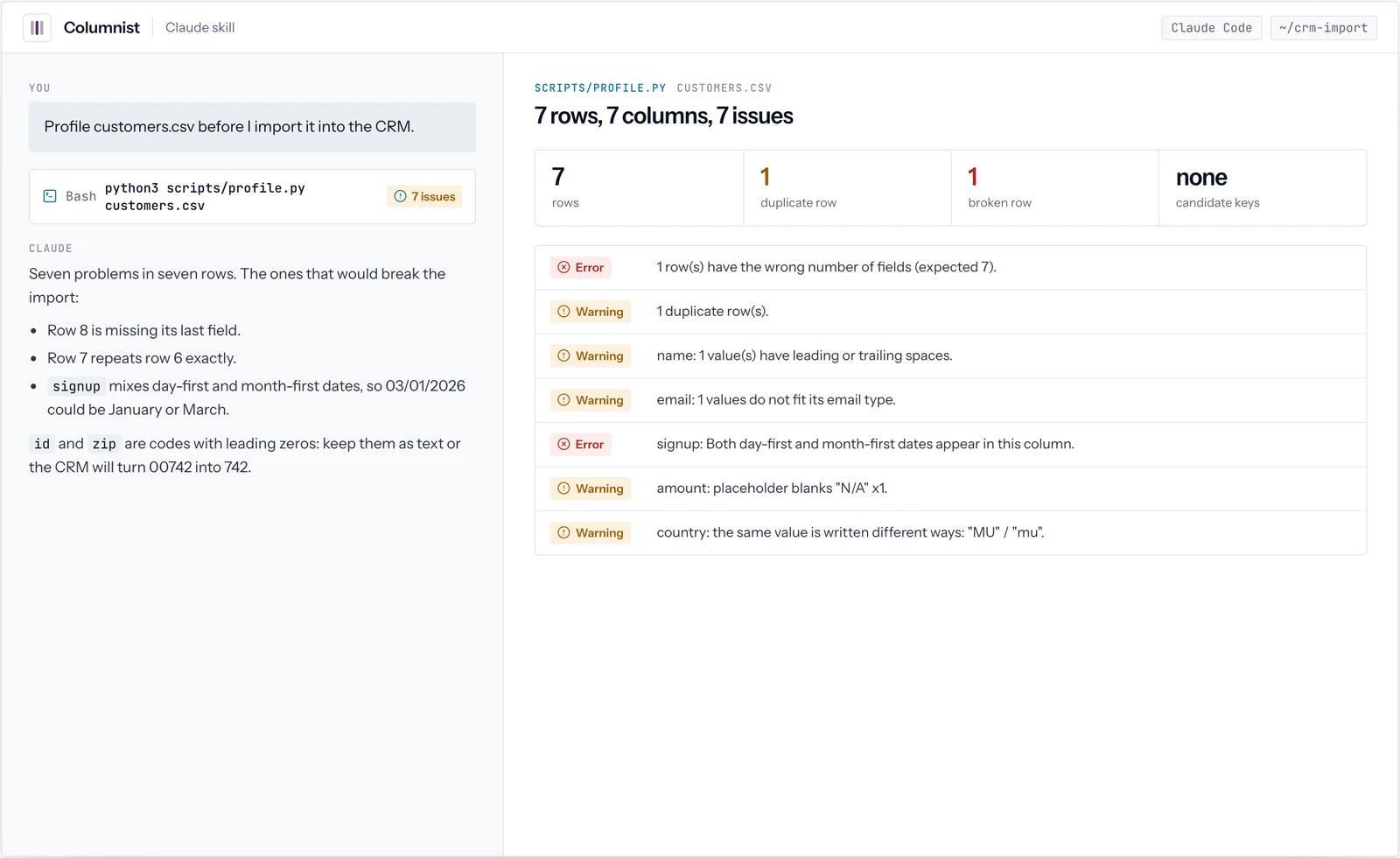
Columnist is a data profiling and data quality check skill for Claude. Before you analyse, import or migrate a CSV, TSV or exported sheet, a script reads every row and reports each column’s real type, blanks, distinct and top values, ranges and outliers, stray spaces, values that do not fit, mixed date formats and inconsistent spellings, plus duplicate and broken rows. Claude turns that into a short report, and cleans a copy with a log of every change when you ask.
01See it work
Columnist, in real use.
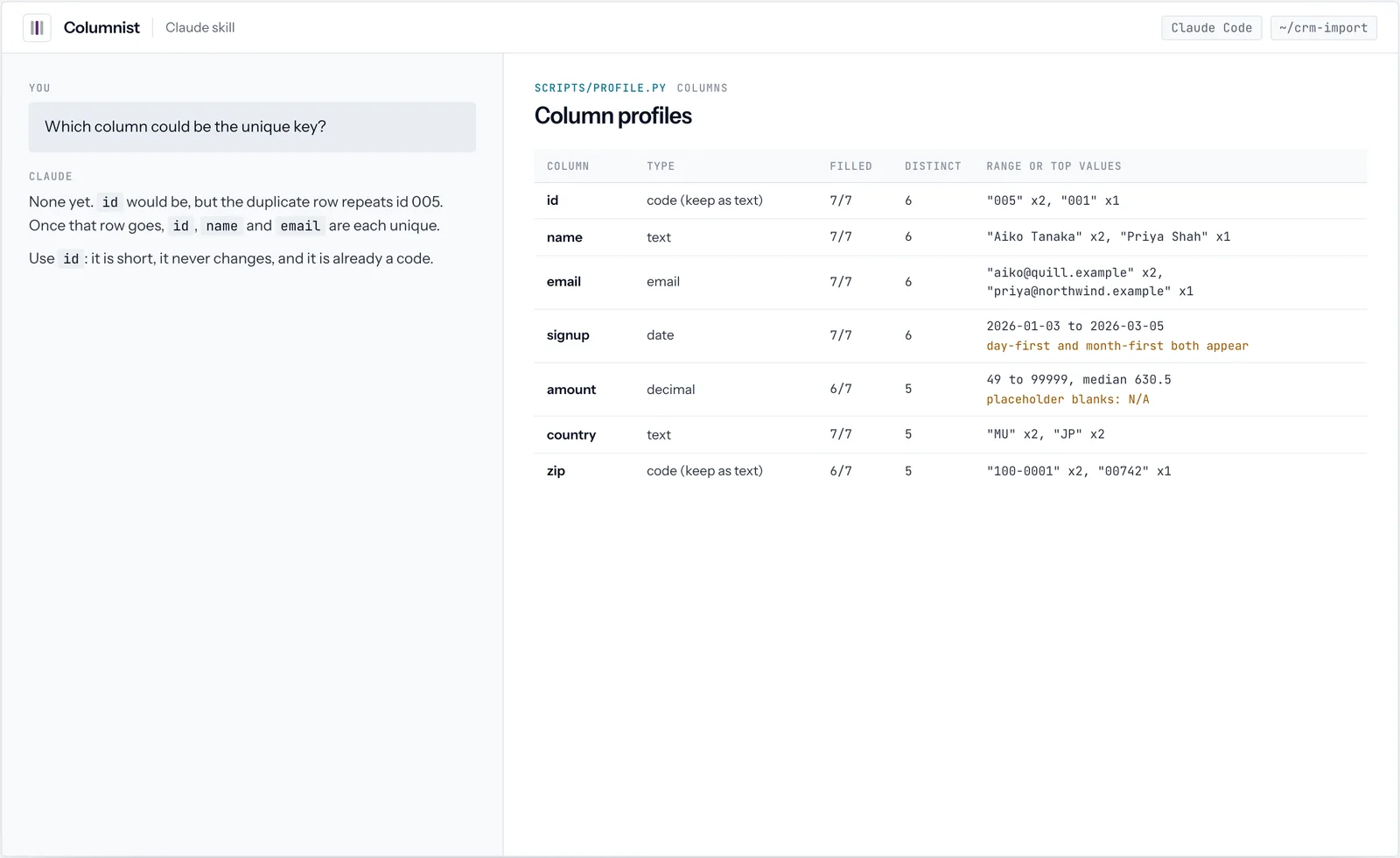
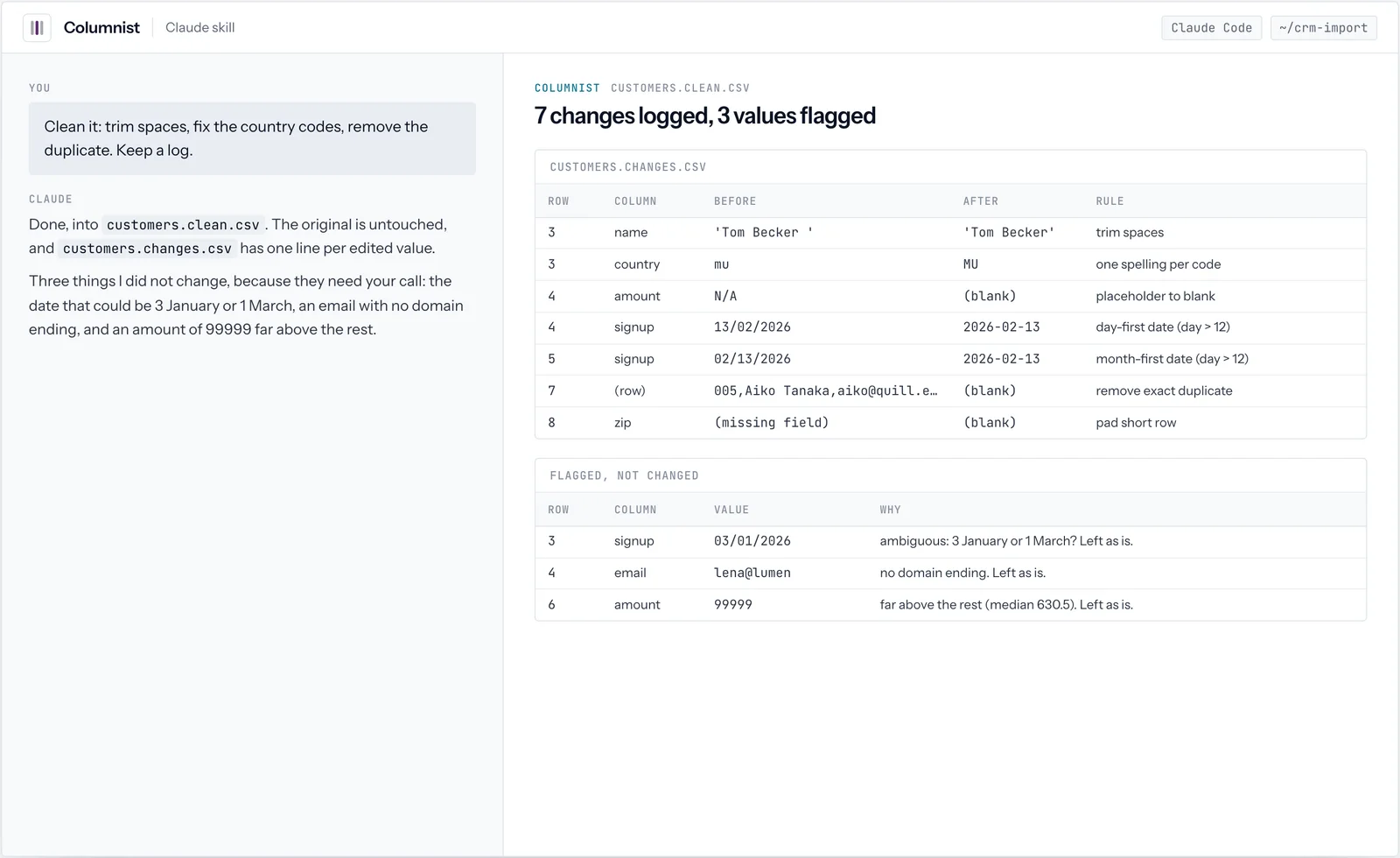
3 screens from real runs of Columnist. Every value shown is what the tool returned; click a screen to open it full size.
02How it works
Profile first, clean only what you agree.
The script reads every row; Claude turns the numbers into a short report; nothing changes until you choose the rules, and then only in a copy.
- 01ReadEncoding and delimiter detected, then every row read, large files streamed.
scripts/profile.py - 02ProfileEach column's real type, blanks, ranges, outliers, spellings and date formats.
- 03ReportThe problems that would break an import first, with counts and masked examples.
- 04Clean a copyOnly the agreed rules, into a new file, with a log row for every changed value.
03What it checks
Data profiling, column by column.
These are the checks profile.py runs on every column and on the file as a whole.
| Check | What it finds |
|---|---|
| Real type | Integer, decimal, date, email, URL, boolean or text, from the values, not the header. Codes with leading zeros are kept as text. |
| Blanks and placeholders | Empty cells, and stand-ins such as N/A, null, none and dashes |
| Distinct and top values | How many different values, and the most common ones |
| Ranges and outliers | Minimum, maximum, median, and values far outside the rest |
| Stray spaces | Values with leading or trailing spaces |
| Values that do not fit | An email without a domain ending in an email column, text in a number column |
| Mixed date orders | Day-first and month-first dates in the same column |
| Inconsistent spellings | The same value written different ways, such as MU and mu |
| Duplicate and broken rows | Exact repeats, and rows with the wrong number of fields |
| Candidate keys | Columns whose values are all present and unique |
04Dates
Mixed date formats, and the ones to leave alone.
A date such as 03/01/2026 could be 3 January or 1 March. Columnist converts a date only when a day above 12 settles the order, and asks about the rest. From the real clean-up of a sample file:
| Value | Read as | Why |
|---|---|---|
| 13/02/2026 | 2026-02-13 | The first number is above 12, so the day comes first |
| 02/13/2026 | 2026-02-13 | The second number is above 12, so the month comes first |
| 03/01/2026 | Left as is | Both orders are possible; flagged for you to decide |
05Clean-up
Duplicate rows and every other change, logged.
The change log from the same run. The original file was never touched; three values that needed a person's judgment were flagged instead of changed.
| Row | Column | Before | After | Rule |
|---|---|---|---|---|
| 3 | name | 'Tom Becker ' | 'Tom Becker' | Trim spaces |
| 3 | country | mu | MU | One spelling per code |
| 4 | amount | N/A | (blank) | Placeholder to blank |
| 4 | signup | 13/02/2026 | 2026-02-13 | Day-first date (day above 12) |
| 5 | signup | 02/13/2026 | 2026-02-13 | Month-first date (day above 12) |
| 7 | (row) | 005, Aiko Tanaka, ... | (removed) | Exact duplicate of row 6 |
| 8 | zip | (missing field) | (blank) | Pad a short row |
06Install
Install Columnist.
Install Columnist in Claude Code from the Dude Lemon marketplace, or download it for the Claude apps. Its script needs Python 3.8+.
/plugin marketplace add https://plugins.dudelemon.cloud/marketplace.json/plugin install columnist@dudelemonClaude uses the skill when a task matches its description. You can also call it directly with /columnist:columnist.
07Inside
What is in the skill folder.
SKILL.md- The profile, report and clean workflow, and its rules: never overwrite the original, log every change, keep identifiers as text, flag outliers instead of deleting them.
scripts/profile.py- Detects encoding and delimiter, reads every row, and profiles each column and the file as a whole. Text or JSON output; Excel sheets with pandas installed.
08Ask in your own words
Say what you need. Columnist does the exact part.
Claude reaches for Columnist when a request matches it. You can also ask for it by name.
- Profile this CSV before I import it into our CRM.
- Clean the customer export: trim spaces, fix country codes, and keep a log.
- Which column could be the unique key in this file?



FAQ
Columnist, answered
Anything we have not answered here, ask us directly. A senior engineer replies.
How large a file can it handle?
The script streams every row. Distinct values and duplicate detection are tracked up to large caps (100,000 distinct values per column and 2 million rows for duplicates), and the report says when a cap was reached.
Will it change my data?
Only when you ask, only by rules you agree, and always into a new file with a change log row for every edited value. The original is never overwritten.
What about personal data?
The skill reports counts and masked examples rather than pasting rows of names, emails or phone numbers into the conversation.
Is Columnist free?
Yes. Columnist is free and MIT licensed.
How do I install Columnist?
In Claude Code run /plugin marketplace add https://plugins.dudelemon.cloud/marketplace.json, then /plugin install columnist@dudelemon. In the Claude apps, download https://plugins.dudelemon.cloud/skills/columnist.zip and upload it under Customize, Skills.
Can Columnist read Excel files?
Yes, when pandas and openpyxl are installed: pass --sheet with the sheet name. CSV, TSV and other delimited files need nothing beyond Python.