











A commit message generator that matches your house style.
CommitWise is a commit message generator and pull request writer for Claude Code that measures your house style instead of guessing it: Conventional Commits and the scopes in use, or area prefixes, subject length, capitals, mood, ticket references and trailers, plus commitlint settings and the ticket in the branch name. Every message is linted against that style before it is committed. It splits large changes into single-concern commits down to individual hunks, turns review feedback into fixup commits, and drafts pull requests with real testing steps and reviewers from CODEOWNERS. It can also split a big branch into a stack of small pull requests.
Free, MIT licence. git and Node.js 18+ (GitHub CLI optional).
See it work
CommitWise, in real use.
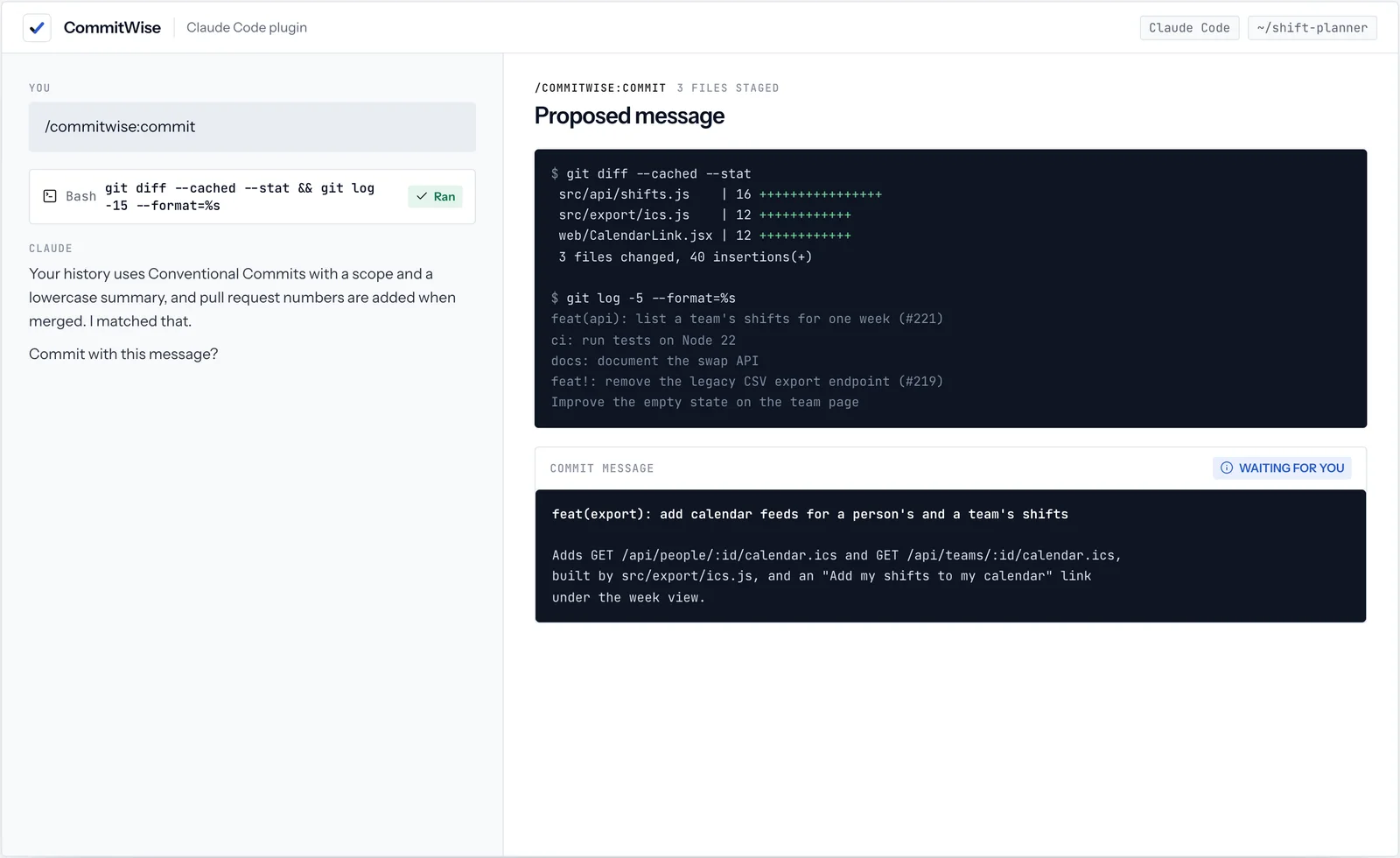
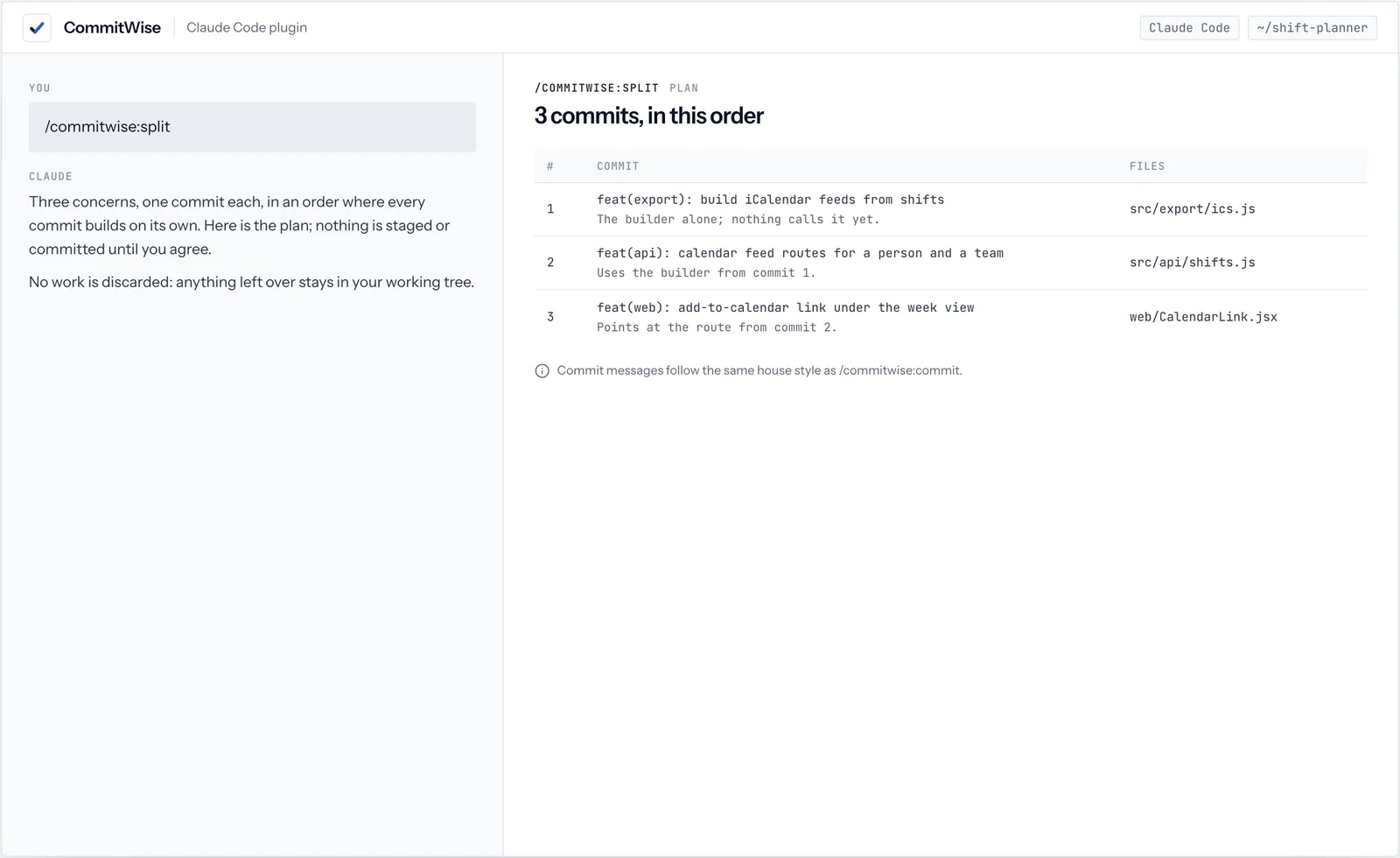
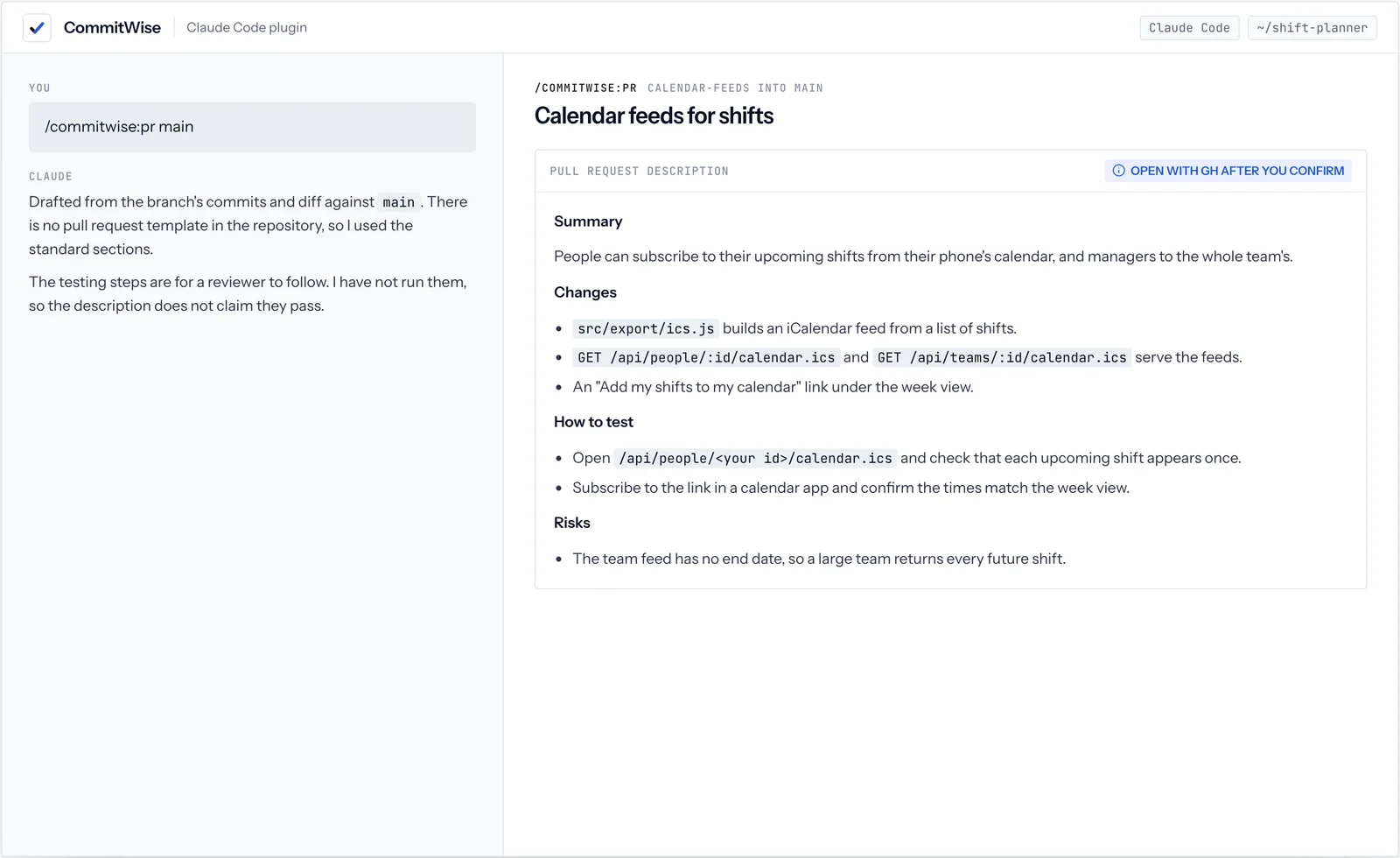
3 screens from real runs of CommitWise. Every value shown is what the tool returned; click a screen to open it full size.
How it works
Three commands, one house style.
Each command reads before it writes: the staged diff, your recent history and your templates. Nothing is committed or opened until you confirm.
- 01/commitwise:commitStaged diff plus the last 15 messages, then a message in the same convention.
- 02/commitwise:splitUncommitted changes grouped into single-concern commits, plan shown first.
- 03/commitwise:prTitle, summary, changes, testing steps and risks, in your template if you have one.
- 04You confirmCommit, split or open the pull request with the GitHub CLI, only after you agree.
The convention
Conventional Commits, at a glance.
When your history uses Conventional Commits, CommitWise writes them too, scopes and all. The type tells readers and release tools what kind of change it is.
| Type | For | Version it implies |
|---|---|---|
| feat | A new feature people can use | MINOR |
| fix | A bug fix | PATCH |
| feat! or BREAKING CHANGE: | A change that breaks existing use | MAJOR |
| perf | Faster or lighter, same behaviour | PATCH in most release tools |
| refactor | Restructured code, same behaviour | none |
| docs, test, ci, build, chore | Documentation, tests, pipelines and housekeeping | none |
Good messages
Git commit message best practices.
The rules CommitWise follows when your history does not say otherwise, with a real message it wrote for a staged change.
- One concern per commit. If the summary needs "and", it is probably two commits.
- A short summary line, about 50 to 72 characters, in the imperative: "add", not "added".
- A body that says why, and what someone needs to know, wrapped near 72 characters.
- Your conventions first. Scopes, ticket numbers and trailers follow what your last 15 commits do.
- Nothing invented. No claims that tests passed unless they ran in the same session.
feat(export): add calendar feeds for a person's and a team's shifts

Adds GET /api/people/:id/calendar.ics and GET /api/teams/:id/calendar.ics,
built by src/export/ics.js, and an "Add my shifts to my calendar" link
under the week view.
Pull requests
A pull request template reviewers can act on.
If the repository has .github/pull_request_template.md, /commitwise:pr fills it in. Otherwise it uses this structure.
## Summary
What this changes and why, in two or three sentences.

## Changes
- Grouped by area, one line each.

## How to test
- Steps a reviewer can follow, with the address, command or data to use.

## Risks and rollout
- What could break, who is affected, and how to roll back.
Install
Install CommitWise.
Install CommitWise from the Dude Lemon marketplace inside Claude Code. git and Node.js 18+ (GitHub CLI optional).
/plugin marketplace add https://plugins.dudelemon.cloud/marketplace.json/plugin install commitwise@dudelemonRun both commands inside Claude Code. The first adds the Dude Lemon marketplace once; the second installs the plugin.
What it adds
What the plugin adds to Claude Code.
/commitwise:commit- Writes the message in the measured house style, lints it, and commits with your confirmation. Add now to skip it.
/commitwise:split- Plans single-concern commits from your uncommitted changes, stages individual hunks without interactive git add -p, and never discards work.
/commitwise:fixup- Aims each review-feedback change at the commit it corrects as a fixup commit, ready for one autosquash rebase.
/commitwise:pr- Title, summary, grouped changes, concrete testing steps, risks and rollout, related issues and CODEOWNERS reviewers; uses your template; opens it with the GitHub CLI on request.
scripts/- conventions.mjs, lint.mjs, hunks.mjs and owners.mjs, which you can also run yourself.
/commitwise:stack- A large branch split into a stack of small pull requests, each based on the one before.
Try it
Use it as you work.
Hooks work on their own; commands run when you type them in Claude Code.
- /commitwise:commit
- /commitwise:split group the refactor separately
- /commitwise:pr main create
FAQ
CommitWise, answered
Anything we have not answered here, ask us directly. A senior engineer replies.
Contact usDoes it add AI attribution lines?
Only if your history already uses them. CommitWise follows the conventions it measures in your recent commits.
How does it split a file that mixes two changes?
hunks.mjs lists every changed hunk with an id and stages exactly the ones you choose, so one file can go into two commits without interactive git add -p.
Will it rewrite history or force-push?
No. /commitwise:fixup creates fixup commits and tells you the rebase command to fold them in; running it is up to you.
Is CommitWise free?
Yes. CommitWise is free and MIT licensed.
How do I install CommitWise?
In Claude Code run /plugin marketplace add https://plugins.dudelemon.cloud/marketplace.json, then /plugin install commitwise@dudelemon.
Can CommitWise open the pull request for me?
Yes, with the GitHub CLI installed and signed in: run /commitwise:pr <base> create, check the draft, and confirm.