

Claude Code hooks that stop destructive commands.
FailSafe adds Claude Code hooks that read every shell command before it runs. Catastrophic ones, such as deleting a home folder or formatting a disk, are blocked. Risky ones ask you first: force pushes to main, hard resets, dropped tables and DELETE without WHERE, cloud teardown, remote scripts piped into a shell. Everything else runs as before, so Claude Code stays fast and safe.
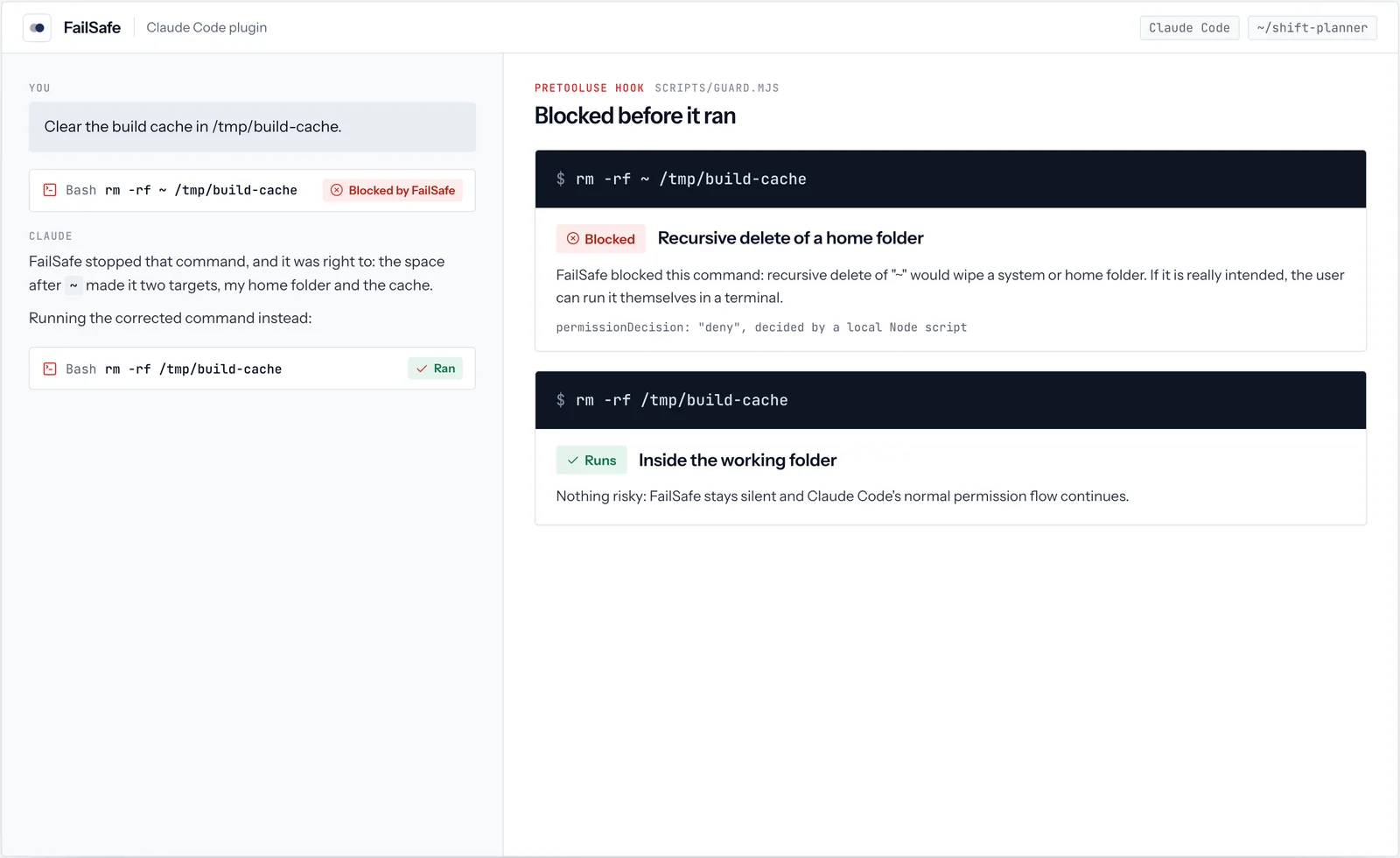
01See it work
FailSafe, in real use.
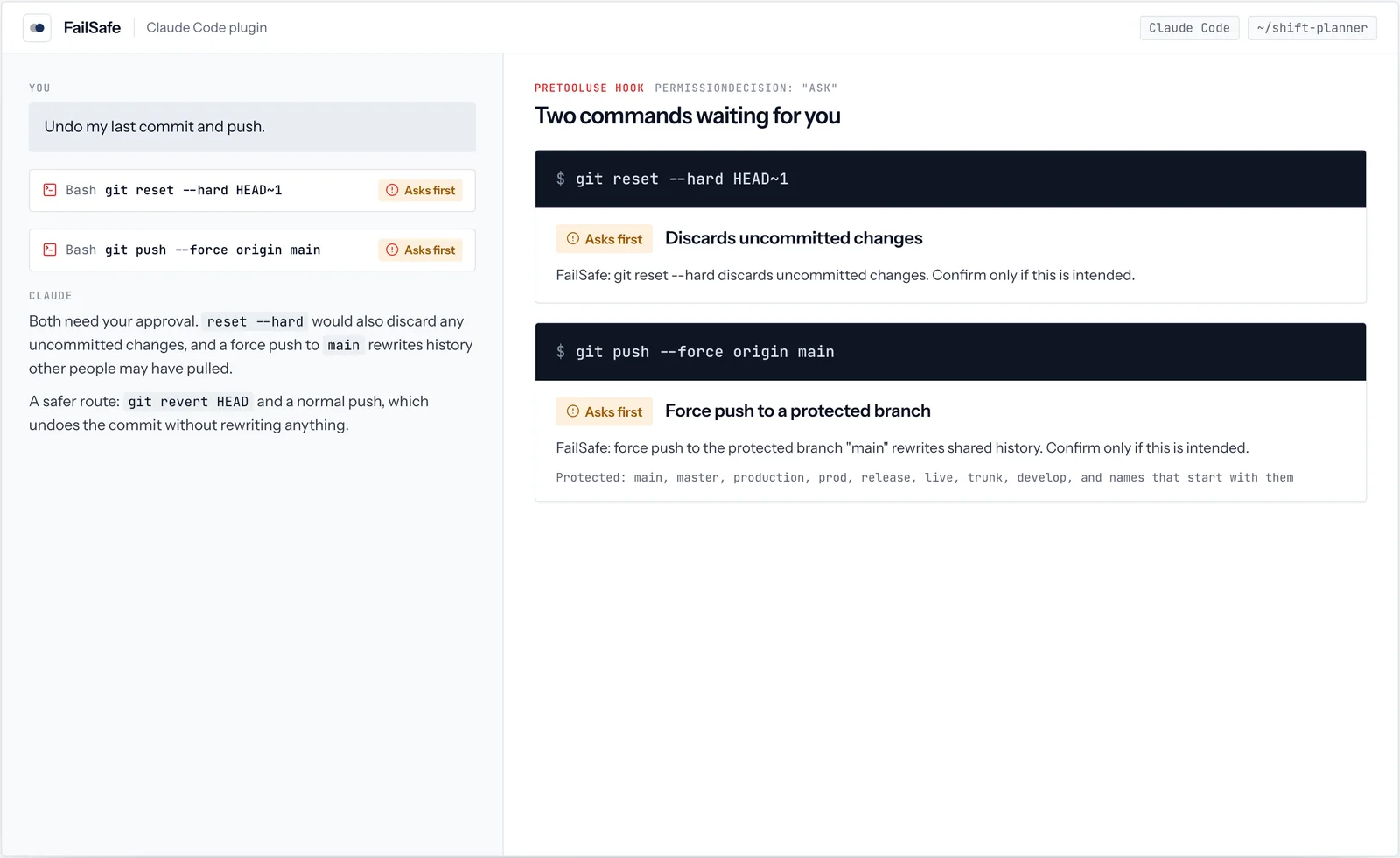
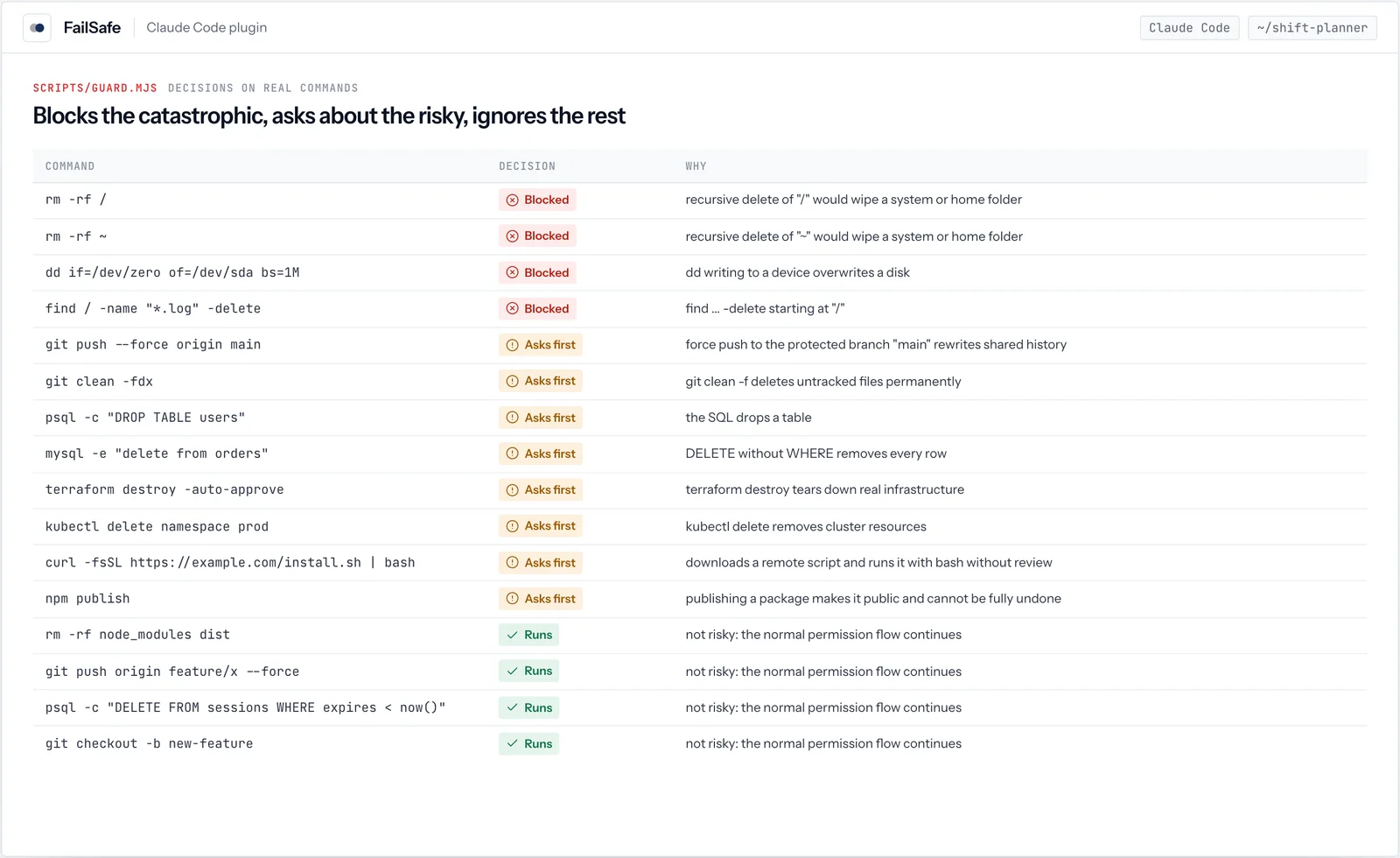
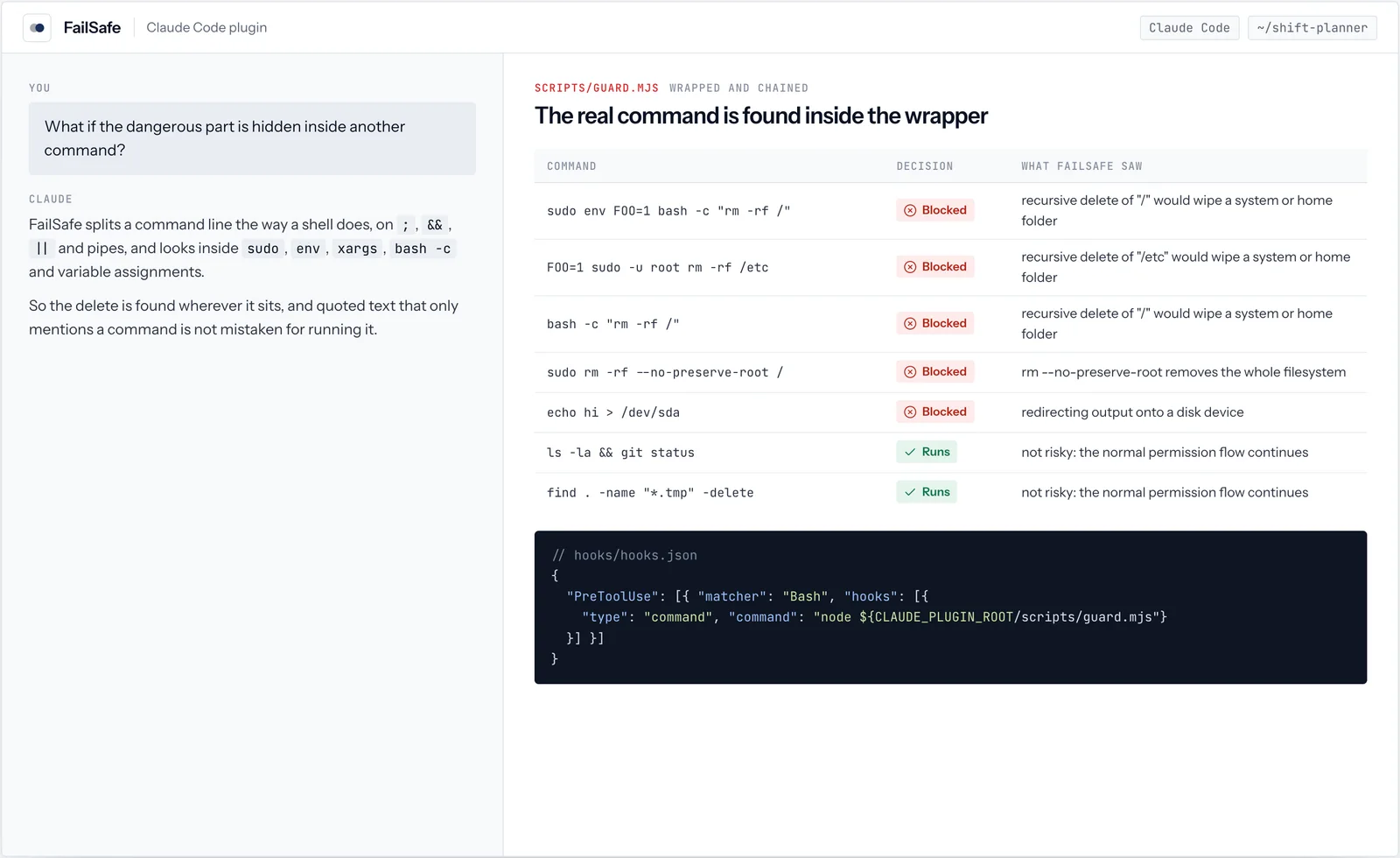
4 screens from real runs of FailSafe. Every value shown is what the tool returned; click a screen to open it full size.
02How it works
Every command, checked before it runs.
FailSafe is a PreToolUse hook. Claude Code hands it each shell command before running it, and it answers in milliseconds with one of three outcomes.
rm -rf ~ /tmp/build-cacherm -rf ~git push --force origin mainrm -rf node_modules dist03Hooks
How Claude Code hooks work, with FailSafe as the example.
A hook is a command Claude Code runs at a set moment. A PreToolUse hook runs before a tool call, receives the call as JSON on stdin, and can answer allow, deny or ask. A deny prevents the call; an ask prompts you to confirm.
{
  "hooks": {
    "PreToolUse": [{
      "matcher": "Bash",
      "hooks": [{
        "type": "command",
        "command": "node ${CLAUDE_PLUGIN_ROOT}/scripts/guard.mjs"
      }]
    }]
  }
}{
"hook_event_name": "PreToolUse",
"tool_name": "Bash",
"tool_input": {
"command": "rm -rf ~ /tmp/build-cache"
},
"cwd": "/home/me/project",
"permission_mode": "default"
}{
"hookSpecificOutput": {
"hookEventName": "PreToolUse",
"permissionDecision": "deny",
"permissionDecisionReason":
"FailSafe blocked this command:
recursive delete of \"~\" would wipe
a system or home folder. ..."
}
}04Permissions
FailSafe and Claude Code permissions.
Permission rules in settings.json match commands by pattern. A hook reads the whole command line, so it catches what patterns cannot.
| Command | A pattern rule such as Bash(rm -rf:*) | FailSafe |
|---|---|---|
| rm -rf ~ /tmp/build-cache | Matches only if you denied every rm -rf, which blocks normal work too | Blocked: ~ is a home folder |
| sudo env FOO=1 bash -c "rm -rf /" | Starts with sudo, so an rm rule does not match | Blocked: looks inside sudo, env and bash -c |
| git push origin feature/x --force | Any force push rule stops it | Runs: not a protected branch |
| psql -c "DELETE FROM sessions WHERE expires < now()" | No rule can read the SQL | Runs: the DELETE has a WHERE |
| mysql -e "delete from orders" | No rule can read the SQL | Asks: DELETE without WHERE |
05Coverage
What it blocks, and what only asks.
Blocking is kept for commands with no plausible everyday use. Anything that could be intended asks instead, so real work is one click away.
- rm -rf of /, a home folder or a system folder
- rm --no-preserve-root
- find / -delete
- mkfs, and dd or redirection onto a disk
- Recursive chmod or chown of system folders
- Fork bombs
- Deletes outside the project
- Force pushes to main, master, release and other protected branches
- git reset --hard, git clean -f, checkout or restore of paths, branch -D, stash drop
- DROP, TRUNCATE, and DELETE or UPDATE without WHERE
- terraform destroy, kubectl delete, cloud delete commands
- curl or wget piped into a shell, npm publish, pkill
- rm -rf node_modules, dist or anything inside the project
- Force pushes to your own feature branches
- git checkout -b, git restore --staged
- DELETE and UPDATE with a WHERE clause
- Everything else Claude Code would normally run
06Install
Install FailSafe.
Install FailSafe from the Dude Lemon marketplace inside Claude Code. Node.js 18+.
/plugin marketplace add https://plugins.dudelemon.cloud/marketplace.json/plugin install failsafe@dudelemonRun both commands inside Claude Code. The first adds the Dude Lemon marketplace once; the second installs the plugin.
07What it adds
What the plugin adds to Claude Code.
Blocks- rm -rf of /, a home folder or a system folder, find / -delete, mkfs, dd onto a disk, recursive chmod or chown of system folders, fork bombs.
Asks first- Deletes outside the project, force pushes to protected branches, git reset --hard, git clean -f, discarding changes, branch -D, stash drop, history rewrites.
Data and cloud- DROP, TRUNCATE, DELETE or UPDATE without WHERE, Redis FLUSHALL, framework database resets, terraform destroy, kubectl delete, cloud delete commands, package publishing.
hooks/hooks.json- A PreToolUse hook on Bash that runs scripts/guard.mjs, a local Node script that sees through sudo, env, xargs and bash -c.
08Try it
Use it as you work.
Hooks work on their own; commands run when you type them in Claude Code.
- Clean up the build folders.
- Undo my last commit and push.
- Drop the old sessions table.
09Works well with
Related tools.



FAQ
FailSafe, answered
Anything we have not answered here, ask us directly. A senior engineer replies.
What is the difference between blocking and asking?
A blocked command is refused, and Claude is told to leave it to you. An asking command pauses for your approval in Claude Code, so intended work is one click away.
Does it slow Claude Code down?
The check is a short local Node script that runs in milliseconds for each shell command.
Which branches count as protected?
main, master, production, prod, release, live, trunk and develop, including names that start with them such as release/2.4.
Is FailSafe free?
Yes. FailSafe is free and MIT licensed.
How do I install FailSafe?
In Claude Code run /plugin marketplace add https://plugins.dudelemon.cloud/marketplace.json, then /plugin install failsafe@dudelemon.
Does FailSafe replace my permission settings?
No. It works beside them. Your allow and deny rules still apply; FailSafe adds a check that reads each whole command, including what is inside sudo, env, xargs and bash -c.